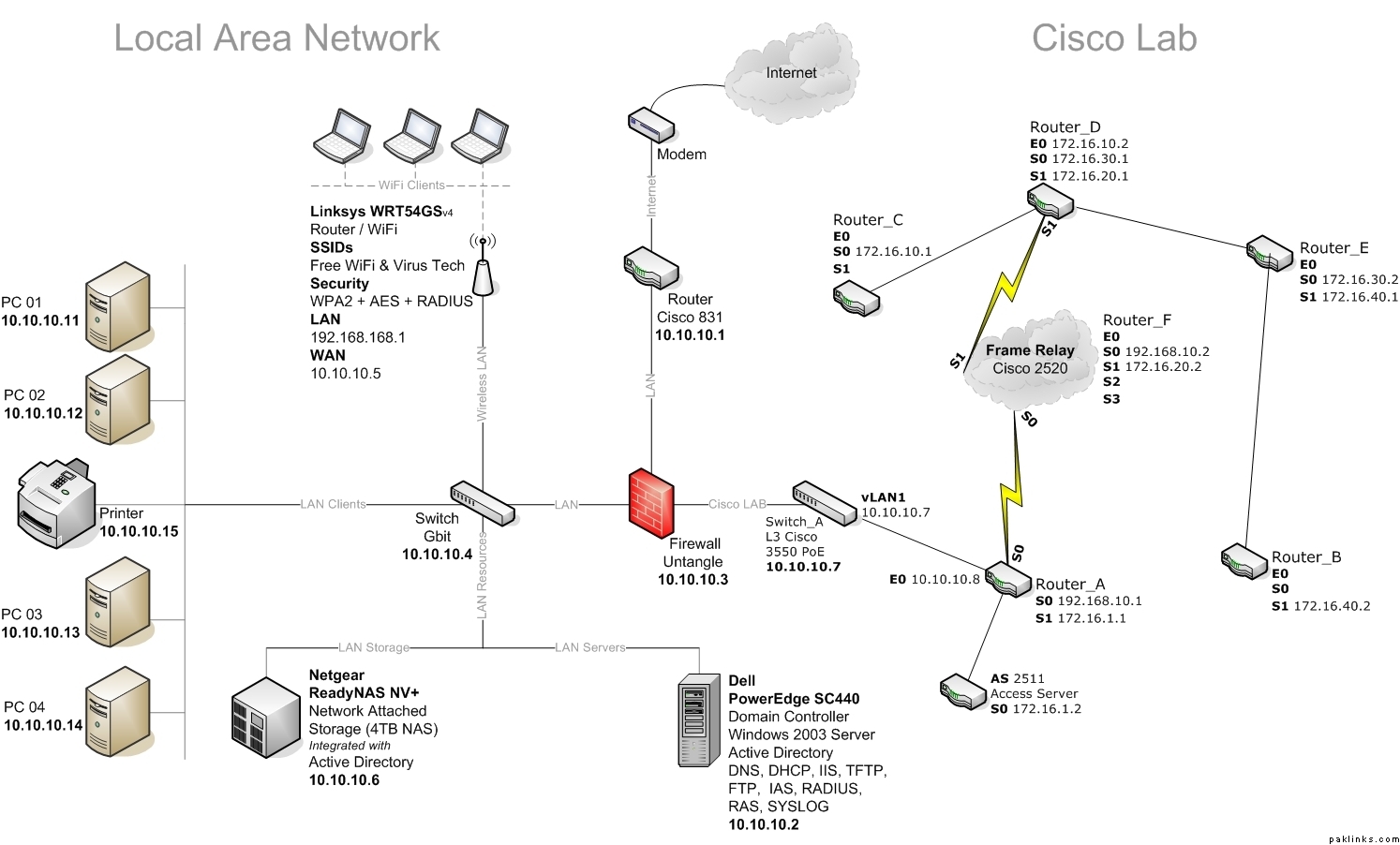
Re: Your home network setup?
yeah, it depends what you are getting with the product and its condition.
I don’t know what you’re talking about here.  Show me? AFAIK, console cables are same for all cisco routers.
Re: Your home network setup?
yeah, it depends what you are getting with the product and its condition.
I don’t know what you’re talking about here. Show me? AFAIK, console cables are same for all cisco routers.
Re: Your home network setup?
hiiii jaan leva
Re: Your home network setup?
on ebay 2500 serious is 25$ if it can give me the inter face/memory thingie/modes then I will buy one.
My other cocern is console cable look very strange for 2500 serious. With out a jack??
$25 sounds about right for a 2500, just double check with the seller that its in working condition.
Most of the console cables are flat cables. The newer routers come with a light blue ones which has a DB9 slot at one end and RJ45 on the other. Older routers used to come with (again a flat cable) which had RJ45 on both ends and then there was this RJ45-DB9 adapter which had to be used. As the 2500 is one of the older models it probably comes with the latter cable so my guess is that its missing this adapter. ??
Re: Your home network setup?
$25 sounds about right for a 2500, just double check with the seller that its in working condition.
Most of the console cables are flat cables. The newer routers come with a light blue ones which has a DB9 slot at one end and RJ45 on the other. Older routers used to come with (again a flat cable) which had RJ45 on both ends and then there was this RJ45-DB9 adapter which had to be used. As the 2500 is one of the older models it probably comes with the latter cable so my guess is that its missing this adapter. ??
Thanks TB
Once I saw some one programming a tv cable box(dish antenna)
they had this cable which was connected to db9 on pc and on the other end it had 6 or seven copper legs more like a power plug.
That guy had to hold that connector against the PCB of the receiver, in order to transfer data.
On ebay I saw same connector(console cable) for 2500 router, that's way I didn't buy it.
I will try to find an actual picture of it and then post it here.
Re: Your home network setup?
Well, there’s tons of serial cables out there in the wild. This is what you’re looking for:
Jaan Leva, you have given me a good idea to buy used networking stuff from ebay but really I am interested in Netgear firewalls and storage systems. I am planning to open a solutions company for VPN IPsec and SSL tunnels using Netgear most probably with DGFV338 because ADSL is inbuilt into that I am looking into FGX 538.
The whole point is I don’t want go to Cisco because first ASA are too expensive in Pakistan requirements and Netgear are very cheap and affordable. Anyway I am thinking of calling the Account Manager for Netgear where I will now to talk to him about this.
Anyway how good you are configuring firewalls? I am interested in ASA 5505, TZ 170 and DGFV338.
Jaan Leva, you have given me a good idea to buy used networking stuff from ebay but really I am interested in Netgear firewalls and storage systems. I am planning to open a solutions company for VPN IPsec and SSL tunnels using Netgear most probably with DGFV338 because ADSL is inbuilt into that I am looking into FGX 538.
The whole point is I don't want go to Cisco because first ASA are too expensive in Pakistan requirements and Netgear are very cheap and affordable. Anyway I am thinking of calling the Account Manager for Netgear where I will now to talk to him about this.
Anyway how good you are configuring firewalls? I am interested in ASA 5505, TZ 170 and DGFV338.
Yep, used equipment helps us on the budget. I just bought the Cisco 3550-24 PoE for $400 or so, retail is in the $x,xxx.
I have configured and supported PIXes (505, 515E, 525, ASA 5500 series) mainly, not really familiar with netgear... but how hard could it be? Its all web based GUI anyway so anybody with basic networking knowledge shoudl be able to walk through it and setup VPN tunnels, maybe with some help. I don't think netgear broadband routers belong in enterprise / SMB environment, regardless of the locality.
Yep, used equipment helps us on the budget. I just bought the Cisco 3550-24 PoE for $400 or so, retail is in the $x,xxx.
I have configured and supported PIXes (505, 515E, 525, ASA 5500 series) mainly, not really familiar with netgear... but how hard could it be? Its all web based GUI anyway so anybody with basic networking knowledge shoudl be able to walk through it and setup VPN tunnels, maybe with some help. I don't think netgear broadband routers belong in enterprise / SMB environment, regardless of the locality.
Not in enterprise but definitely SMB. Thats the market I am looking into. The truth is ASA (PIX is EOL right now) is way too expensive for countries like Pakistan, India and China. If the customer is opening up his new business there he can't afford get two ASA for site to site or the mobile client for 15 or more employess.
The good thing about netgear it has wireless, xDSL and firewall in one box, I just installed in a SMB in Dubai and the customers were very happy. On top of it DDNS are working in that and I have configured Cisco 2811 with security plus IOS and DDNS was not working in that. I have talked to people in Cisco they tell me DDNS is not working or stable in the IOS. You to have to understand that DDNS in the name of the future until IPv6 doesn't come along.
Why you need 24 PoE for, are you having lot of VoIP setup? And I have starting to think if ebay will deliever to Pakistan and what will the overseas taxes.
Re: Your home network setup?
If that is the case then try looking into DD-WRT solution as well, its free.
ASA is the latest solution from cisco which replaces the 500 series PIXes... so you can get 505s or 515Es pretty cheap and site to site work just fine.
Also, you can set up site to site vpn on routers ($100 or so for 2610s on ebay) as well... along with firewall features (ip inspect, etc.) much like a pix and NAT/PAT.
3550-24 is a 24 port switch with poe which allows you to use IP phones to test cisco's VOIP solutions... I bought it for my LAB.