Share your home network setup & Infrastructure 
Heres mine
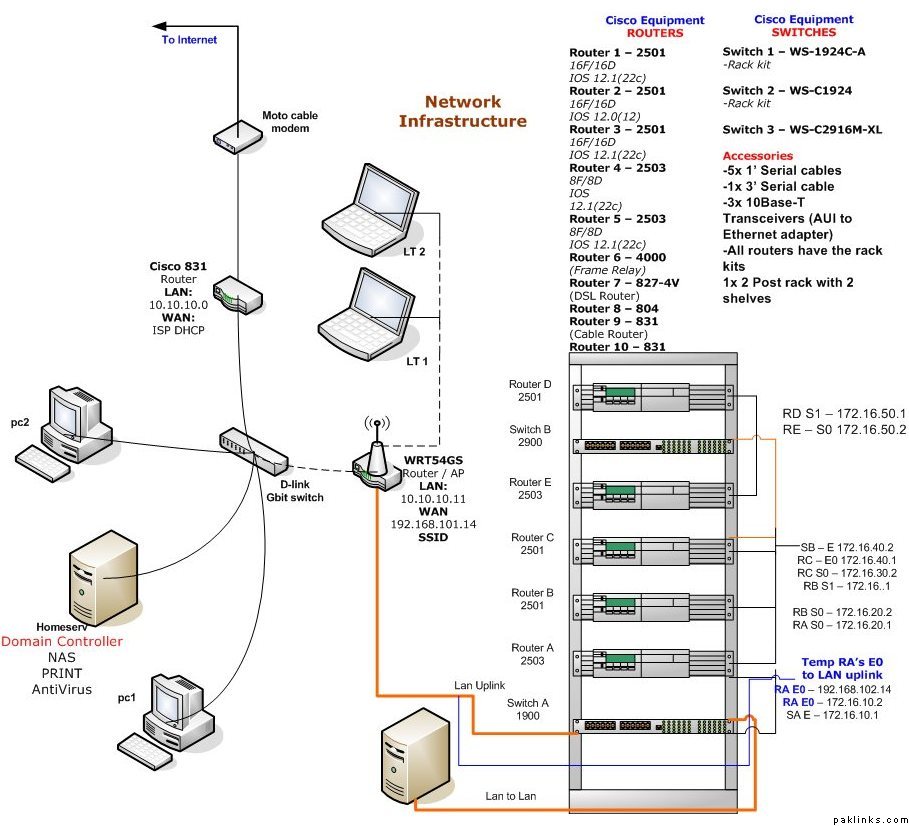
Share your home network setup & Infrastructure
Heres mine
Re: Your home network setup?
What the hell is that? How did you do that?
Re: Your home network setup?
The rack is my cisco lab... as far as diagram itself, used MS Visio, not best of my work *in this.* :P
Re: Your home network setup?
very nice jaan leva. Now i know exactly where to enter from. You made it easier.
Re: Your home network setup?
^ try not to put the honey in the pot ;)
Re: Your home network setup?

If you can go through the cisco 831, let me know. 
I am looking for an older used pix (505 perhaps) to put in between modem and the router.
Re: Your home network setup?
look hardcore
are you doing your CCIE lab here
Re: Your home network setup?
was doing CCNP but unfortunately ccna expired so... now couple of friends use it for their own ccnp/ccna quest.
Re: Your home network setup?
good one yaar .plz make one in my home too
Re: Your home network setup?
pehlay yeh image post ki hoti to meri assignment main use ho jati
Re: Your home network setup?
pehlay yeh image post ki hoti to meri assignment main use ho jati:D
Re: Your home network setup?
Lets just hope you don't fail that class... ;)
Re: Your home network setup?
Jaan Leva and Samad, guys where you from? I need to setup some networking things. I only have wireless network setup at the moment. Need to practice for my CCNA
Re: Your home network setup?
Im in the USA, South. :D
What do you need to do?
Re: Your home network setup?
Hi, I dont have network in my home, however i’ll esatblish it later…here is network of my office..
[media]ImageShack - Best place for all of your image hosting and image sharing needs
Re: Your home network setup?
JL, you let others play with ur toys? I hope you have all configs backed up.
Sweet setup BTW, I was thinking of setting up something similar, not at home though. :)
Re: Your home network setup?
Yes sir (not others, just friends), backing up the config is part of the bi-weekly process plus it allows me remember the critical commands. 
Actually, the cisco equipment that you see is not expensive. I bought it for $100 bucks from an ex cisco reseller… the cisco 831s were expensive though, $100+ for each on ebay but I like them, much better than linksys, more control, etc.
The lab config looks something like this
Since there are multiple connection from one router to the other, even if you chang the config for testing purposes you can get to one interface on the router and change it back. I still need to figure out how these online companies do it which resets the config back to original once the user’s time slot expires.
Moreover, check this out:
Yasir, thats pretty good… office to office layout looks good and helpful at times.
I wish, I can show you some of the visios I’ve made for work and previous job.  Let’s see.
Re: Your home network setup?
$100 is not bad, what did you get in that? all the 2500's and the switches? 831's are newer hence more expensive. How new is the IOS on the 2500's?
In your setup, do you have switches in between all the routers so that you can plug in PC's in wherever you desire? I was thinking just getting a bunch of wifi AP's between each set of routers and just connect the laptop whichever segment I want.
Re: Your home network setup?
The list of equipment is included in the diagram... under cisco routers, switches and accessories.
The IOS isn't bad, I did upgrade to something after 12.0 but I think these are all early deployment releases... hey, it does the job alright for testing and lab studies.
The telnet from external IP goes over to the first router that you see, the telnet is setup on unique port (not 23, since default is pointed to the 831 gateway) so IPADDRESS:port# takes you to the telnet to the first router or do RDP connection, again using unique port mapping over to the PC that is next to the rack.
Example:
24.25.26.10:2323 > telnet to the first router in the lab on its port 23
24.25.26.10:3383 > RDP into PC next to the rack on its 3389 port.
Well, wi-fi APs would help but its not like you are 100s of feet away and there are walls, etc. between your routers. It is all setup next to each other so there is no need for APs... maybe one would do and if you can get cisco AP (something like Aironet 1231s), that just makes things better.
Re: Your home network setup?
Well, sometimes one is not right next to them routers, if you know what i mean. I like to access my stuff from wherever I am.
I tried a 12+ ios on a 2501 but it didn't take, I think not enuff memory. The wifi AP's are just so u can move easily between segments and play around with connectivity etc. It was just a thought anyway.
