go to Start >> My Computer >> (right mouse button and scroll down ) Properties
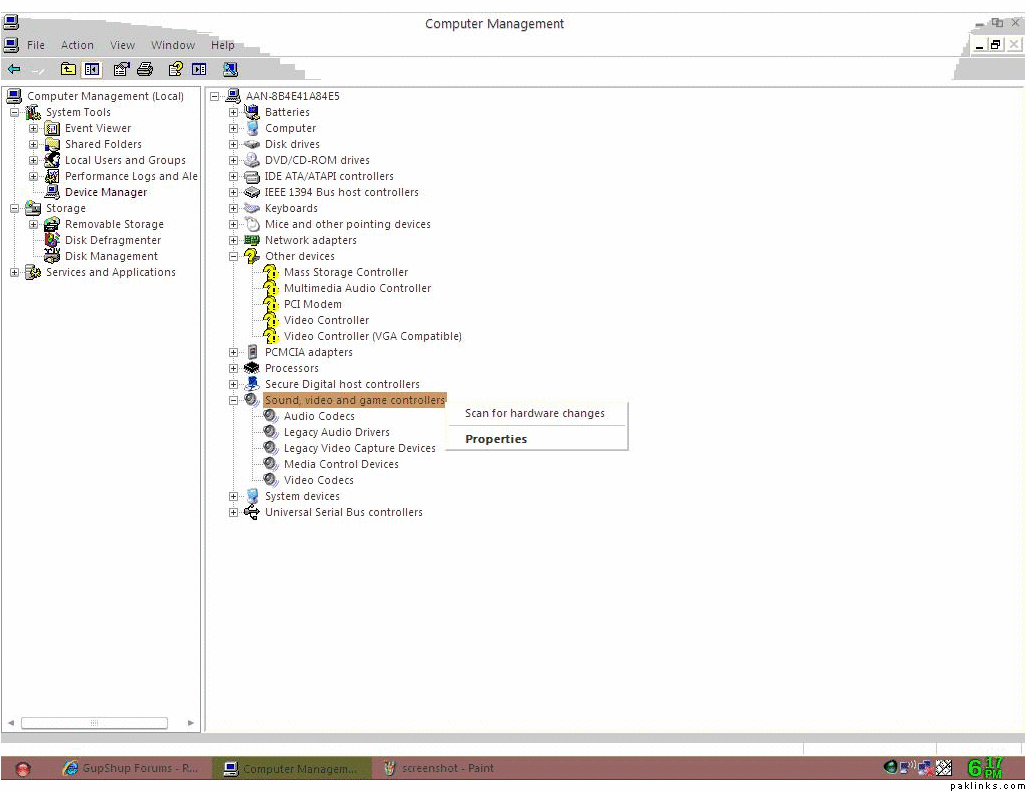
when the Properties Windows open, go to "Hardware" tab and then click on "device manager" button
That should open Device Manager window .. Go to Sound, Video and Game controller section and see if you find a yellow exclamation mark in front of a name ..
click that, press right mouse button and it should give you option to install driver ..
umm if you know what soundcard it is, you can go to the manufactors' site of the sound card and download th e driver from there or if you have a dell you can go to support.dell.com and give it your computer info model and stuff and it'll give you a suggested driver for your sound. ^_^ .
XP/Vista should be able to recognize the manufacture of your sound card automatically and should be able to download the driver directly from its website
TLK so does that mean i dont have XP/vista.... but i thought i downloaded XP .... and if i want to download the sound on my laptop .... how can i do that...
oh btw it was my laptop... jst so you know if this makes any difference...
No I am not saying that you dont have XP .. what I am saying that when you follow what I wrote in post #5, Xp should automatically download and install the driver