playing 1080P videos on PC, I do know that CPU has to be strong to handle it (720P can be played without problem), but my question is what if you ONLYincrease the RAM and keep the CPU as it is? like from 1gb to 4gb RAM increase without changing cpu**
Will that help? or not.**
lets say its 3600+ AMD 64 with 1GB of RAM.
Will be waiting for some replies. Please dont google and paste, only write from ur own experience and knowledge.
playing 1080P videos on PC, I do know that CPU has to be strong to handle it (720P can be played without problem), but my question is what if you ONLYincrease the RAM and keep the CPU as it is? like from 1gb to 4gb RAM increase without changing cpu
Will that help? or not.
lets say its 3600+ AMD 64 with 1GB of RAM.
Will be waiting for some replies. Please dont google and paste, only write from ur own experience and knowledge.
Nope I dont think it will make alot of difference. You d better buy a new videocard with hardware solution :D
Tofi what is it that I am doing wrong then? I just dont get it.
You sure that 3600+ AMD 64 with 1GB of RAM is enough?
Nope its not enough. :D
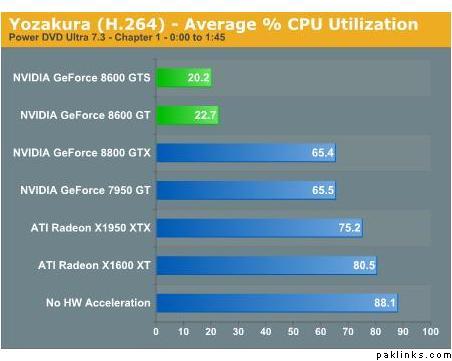
The videocard you are using right now is an Nvidia GS7600 WITHOUT hardware accelleration. This means that the video will be rendered completely by your CPU which will result in a CPU usage of 70-80 % atleast !!!! Adding extra RAM will make some difference but not much.
There is one option: The 8x00 series from Nvidia. Almost all of them have hardware acceleration for HD video. The new ATI range will have the same features to play 1080p video.
TB: There is a major difference between 1080i and 1080p. Currently I can play 1080i movies on my X2 3800+ with 1.5 GB ram and onboard videocard without any problems . 1080p? Impossible for me to play :D
I suppose you are not a gamer? Well here is some help
You need this: NVIDIA GeForce 8600: Full H.264 Decode Acceleration
And thats why I m recommending this one: WinFast PX8600GTS, PCIe, GeForce 8600GTS, 256MB DDR3 for 1.899,00 incl. moms?
It is futureproof full DX10 support including the heaviest Bleuray and HD codec hardware support
Hey! I am displaying 1080p on my computer which has ATI X1650 pro without any problem. The CPU usage remains 30-40%. I used the word displaying because I am using a Satellite card to receive 1080p signal from a Chinese satellite.
Initially, i could not play 1080p properly. Either the picture used to stutter or there used to be big lag between sound and picture. The only thing I changed was the video codec. I changed to CyberLink Video/SP Decoder V6 and it started working like a charm. Earlier I was using Sonic CineMaster decoder.
Hey! I am displaying 1080p on my computer which has ATI X1650 pro without any problem. The CPU usage remains 30-40%. I used the word displaying because I am using a Satellite card to receive 1080p signal from a Chinese satellite.
Initially, i could not play 1080p properly. Either the picture used to stutter or there used to be big lag between sound and picture. The only thing I changed was the video codec. I changed to CyberLink Video/SP Decoder V6 and it started working like a charm. Earlier I was using Sonic CineMaster decoder.
Try this before you buy.
your satellite card (in your computer?) with HD support is rendering the signal :D
Samad: how much did you pay for the card (in euros) ? I m thinking of getting one aswell.
I have captured the clips in full 1080p resolution as well without any problem.
I went through some article on Anandtech or Howardforum where they were mentioning the inability of the current generation graphics card to render graphics at full HDTV resolution. I was a bit surprised to read that knowing that I can display it on my screens. However, rendering game graphics is much more processor consuming than decoding video.
 Well here is some help