Do you use online storage drive?
If yes, do you pay for the service?
Re: Online Storage
I think there was another thread for cloud storage. I would like to know as well which is the cheaper but effective service
Re: Online Storage
I don’t really trust cloud storage. I use Apricon Padlock to store my important stuff. It’s an encrypted external hard drive basically.
Re: Online Storage
Nope.
I have very little trust for *cloud *storage, and only use it for business reasons. Knowing the infrastructure and how it can be compromised is enough for me to not use it for *personal *storage. You are better off having NAS (Network Attached Storage) at home and using it to storage and sync up your phones, tablets, PCs vs exclusively storing everything online.
Re: Online Storage
I have google, dropbox and icloud that I pay for.
Re: Online Storage
How much is the cost?
Re: Online Storage
about $250?
Re: Online Storage
I see that 2 of you dont trust the cloud storage. Why? I see companies trying to push cloud computing more and more. Also, with the NAS and other offline methods is there a way to backup phone’s photo’s and other things automatically?
@Theorist @Tirchi_Topi_Wala
Re: Online Storage
Most of the concern is with privacy and security. Considering how many large companies were hacked recently, from home depot to target to HSBC, it doesn’t help as far as my confidence is concerned. Knowing that you have the control of your data is far better feeling than some engineer going through your files… yes that is really simplifying it but at the end of the day “cloud” really is just bunch of storage arrays/disks made to look seamless “storage” available to you and the other customers. Behind that **pretty **amazon cloud, dropbox or google cloud app, there are a lot SAN storage and hardware.
I have 3 NASes at home, thinking about building 4th one. As far as data, from PC data is available (using macrium to backup and sync), my phone data is synced to the NAS using FolderSync app and same with tablet that I use for reading, taking it further, scanned documents from the printer are also available to phones, tablets, PCs through same storage.
Re: Online Storage
I will give you that but I dont have much data that needs backup just the photos and music. The one thing that I love is that google keeps my photos on google photos and drobox is a secondary backup. I do perform data backups at home on the 3 TB drives that I have.
Re: Online Storage
I use Dropbox, Google Drive and One Drive for online storage. I’ve paid for Dropbox in the past, which increases the storage capacity to 1TB.
Re: Online Storage
how reliable are these external hard drives? I understand the capacity can be as much as we want but who knows how far they can go
Re: Online Storage
I have been using Google. Due to some early adaption and other perks, I have around 200G of free storage in Google. Google is my main TO-GO cloud back up.
Re: Online Storage
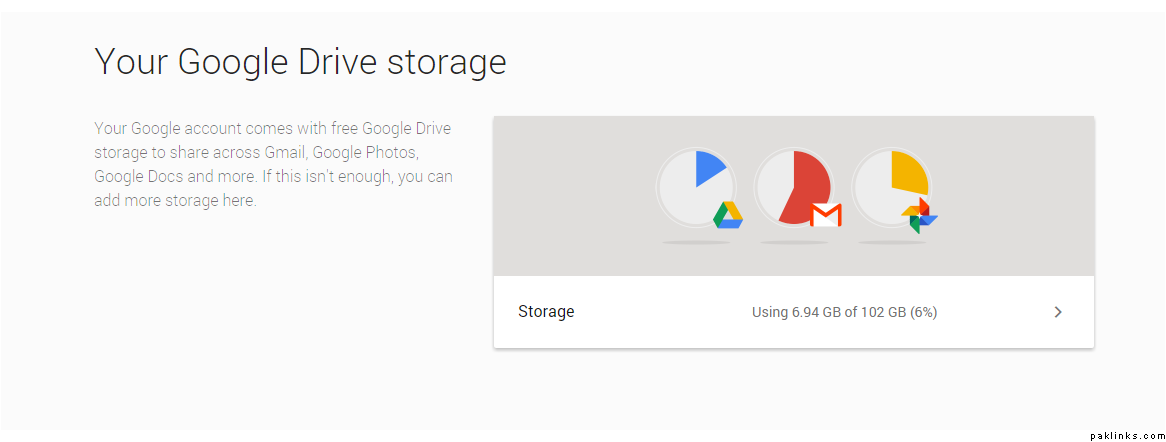
How do you check storage capacity on google cloud?
Please post a screen shot or method to check available space on google drive.
Re: Online Storage
I have 15 GB…
Re: Online Storage
External drive is okay but you may want to have 2 in RAID-1 configuration at least. Hard drives die all the time, at home, you tend to leave them in some corner or move them around so I would use minimum 2 hard drives. You can buy 2-Bay enclosures with RAID1 option.
RAID1 is basically 2 drives *mirroring *each other so if one dies, you still have your data on the other.
Re: Online Storage
Here you go! Went to My Account > Under Account Preferences > Should be a link called Your Google Drive Storage.
Re: Online Storage
I apologize in advance for asking what seems like dumb questions but I am a software guy not much of a hardware guy.
Can I take the hard drives out of the external drives to use in the enclosures or Do I need to buy internal drives?
Re: Online Storage
Don’t worry about it.
I would buy enclosure saperate from the hard drives. Most of the time the “pre-built” external hard drives come with low quality drives and you end up paying more for nothing. Buy internal hard drive (stick with even numbers 4tb, 6tb, etc.) and also buy the enclosure (USB3 at least) separate as well and then just put the drive in the enclosure.
*Green *drives are best for just backing up data, something you won’t access everyday. If you have funds, consider *purple *or something better.
Re: Online Storage
Thanks!
What are green and purple? External or internal?