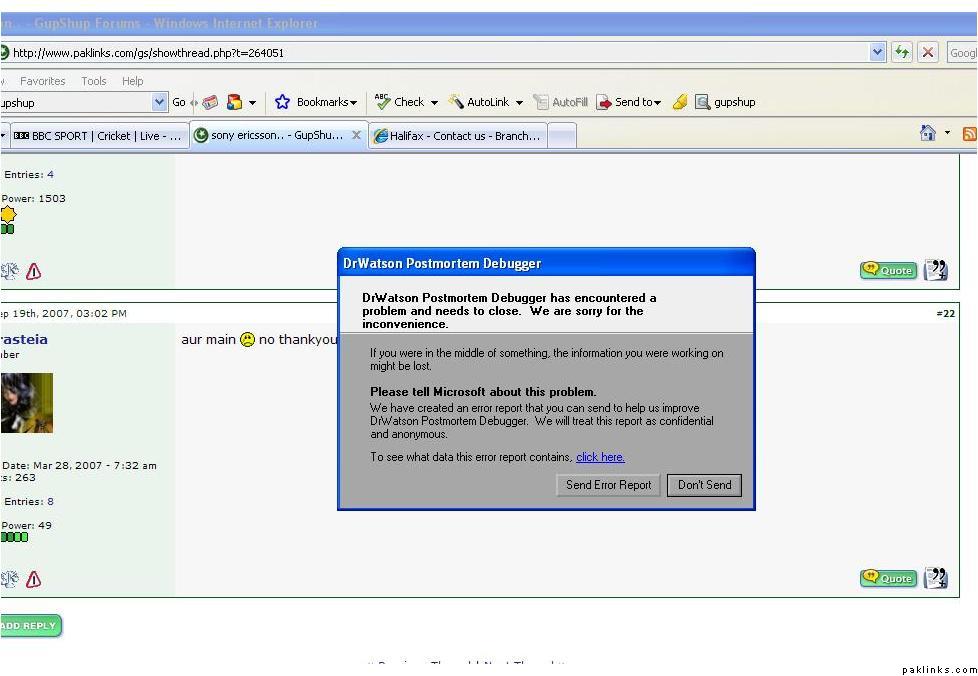
For the past few weeks i’ve been getting this annoying error message when i open click on say My Documents folder or the Recycle Bin or any application as a matter of fact, it some how related to Internet Explorer according to the error report.
Then/if any application are running they all automatically close and i have to one by one re-open them, (this has caused me to lose work on some occasions). I’ve tried deleting the IE version i have on my computer and re-installing, but that hasn’t corrected the problem either, any advice?
This has nothing to do with **Internet Explorer, **its windows explorer.exe the Desktop explorer. You may need to check the event log for further investigation into this problem. Apparently you installed some Windows theme or screen saver (or some other desktop utility) etc that might have messed the explorer up. I cannot tell you the cause of it on top of my head but I am sure you will find it after checking few things.
^ I deleted whatever screen saver apps/DesktopX i had and still no luck.
What happens when you close this window?
Do you get a blank screen?
Did you try to get the latest patches from Microsoft? Sometimes it helps. The update tool (some call it a trojan, :P) checks the signatures of protected files and may be able to figure and fix anomalies in explorer.exe
Come on u guys, this has nothing to do with a web browser.
If windows explorer crashes it doesn't take down other apps. I think there's something more serious going on in your computer. I would suggest backing up your data and reinstall the OS, seriously.
"to view technical information about the error report, click here"
ever tried clicking there???
i don't think its a recognized windows/ie error msg neither a run time error
you are using norton system security(or just their av)
These days laptops come with a hidden partition which has the OS on it. See if you can find System Reinstall/Rebuild option somewhere in All Programs folder. What brand/model is it?
Sorry to know this bro, Sony Vaio sucks. Next time get a Mac, :D
So on a serious note, read the advice from TofiBaba. The OS is installed on a separate partition, normally a hidden one.
If you do not have a recovery CD, make one. There should be a utility from Sony under start>programs (don't remember the name). With this you would be able to bring your Notebook in the same condition as it was at the purchase time.
TofiBaba, if i was to do what you stated above, would i have to backup the contents of my HD before doing so?
First you could just try to restore your computer to an earlier time. This is the safest/quickest fix.
IF not, then....
If you could get a hold of OS, run it as you were to install it, go through until it asks you which partition to install over, it will show your present OS under C: etc...etc..
Click R to repair, it will not install over ur current programs/documents, it will just reinstall windows files and repair anything that may have been corrupted.
It would be a good idea just to backup your stuff, just as a precaution. Then you could just wipe out and reinstall the entire OS and start fresh.