alright, so let’s say i have the following things in one line in microsoft word..
apple orange strawberry
now i want each one of them to be on their own seperate lines
so it should look like this:
apple
orange
strawberry
now if i have numerous lines like these, and i want to separate each word, is there somehow a shortcut to getting it done, instead of hitting ‘enter’ after every word?
i’ve tried looking under the paragraph and formatting options, but can’t seem to find anything..
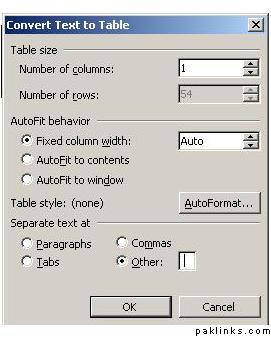
To convert the data 1st select all the data then select Table>Convert
provide the following parameters
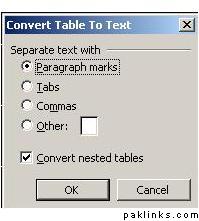
select 1 in number of columns n then enter a Space as the text separater after selecting the Other option. This will convert all your data in a single columned table. Now select this table and then again select Table > Convert
In the parameter window select the followin optionz
n this shud the trick
I hope this is wat u r looking for


 i knew that