Re: Wireless Network Key
quit playing man. i’m gonna chori my dad’s wireless internet and you’re going to help me! 
Re: Wireless Network Key
quit playing man. i’m gonna chori my dad’s wireless internet and you’re going to help me!
Re: Wireless Network Key
nahi it doesn’t =\ the number wala address doesnt work.
Re: Wireless Network Key
do you have physical access to your dad’s pooter? the one thats connected to the router directly?
http://192.168.0.1 or http://192.168.1.1
can u access any of these from there?
Re: Wireless Network Key
nahi it doesn't =\ the number wala address doesnt work.
good luck then:biggthumb
Re: Wireless Network Key
ohhhh wait a minute! my sister set up the internet so maybe i can only get access to those pages from her laptop!! :O
hai na????
Re: Wireless Network Key
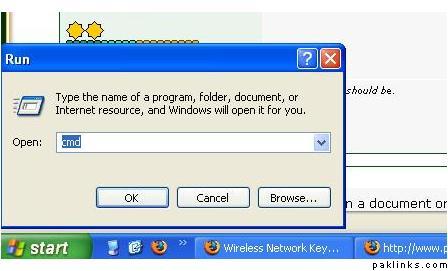
well go to "run" put "cmd"
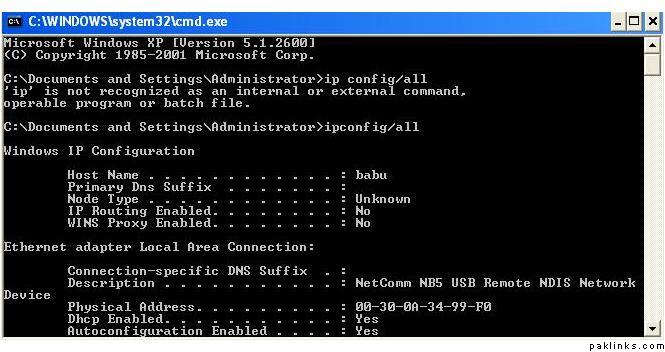
a black dos window will open
there
put this command "ipconfig/all"
and then show me the result
Re: Wireless Network Key
:no: So so sad…
Here are your options:
like lafanter suggestd: go to Run, type CMD
once it pulls up, type in: ipconfig
note down the Default Gateway
Now…exit out of that command prompt.
Go to your internet browser and put in that ip number for ur Default Gateway in the addressbar
No need for http, www, etc..just those number alone and click enter
You will be your routers setup page!
Go to Wireless Settings, or follow one of the links from above, that were posted a bit earlier, they show you how to set it up once you’re at the Router Setup Page.
OR
Reset your router. You won’t launch nukes if you just reset your router. It’s “normal” procedure for times like this.
At the most you’ll just have to reassign a new key, that’ll probably be easier for you to remember, and i’m sure your daddy won’t mind.
Re: Wireless Network Key
sdffsdfas
Re: Wireless Network Key
well can u access the router from her computer?
should be one of these addresses to access the router interface
Re: Wireless Network Key
well now she is married and she lives like an hour away but the next time they come to visit for the weekend i will snatch her laptop and try it out. 
Re: Wireless Network Key
Re: Wireless Network Key
run for your life now 
Re: Wireless Network Key
ur address is
10.0.0.2
Re: Wireless Network Key
what!! is it important stuff?
Re: Wireless Network Key
GO TO
10.0.0.1
put that in your browser's URL bar
no http, www, etc...just 10.0.0.1
and you'll be at your router's Set Up Page.
Go down to Wireless Setting
And you'll see Keys listed on there
Re: Wireless Network Key
i mean put that in ur browser now
like http://
Re: Wireless Network Key
well then u kiss your wireless access goodbye too 
Re: Wireless Network Key
yes we know what you ate for dinner now too 
Re: Wireless Network Key
ur address is 10.0.0.2
its
10.0.0.1 actually lol