I found very good article on svchost.exe, I hope it will help you to understand it.
http://www.howtogeek.com/geekers/up/sshot4d3d3f626fcdc.jpg
You are no doubt reading this article because you are wondering why on earth there are nearly a dozen processes running with the name svchost.exe. You can’t kill them, and you don’t remember starting them… so what are they?
This article is part of our series explaining various processes found in Task Manager, including: jusched.exe, dwm.exe, ctfmon.exe, wmpnetwk.exe, wmpnscfg.exe, mDNSResponder.exe, conhost.exe, rundll32.exe, Dpupdchk.exe, and Adobe_Updater.exe.
Do you know what those services are? Better start reading!
So What Is It?
According to Microsoft: “svchost.exe is a generic host process name for services that run from dynamic-link libraries”. Could we have that in english please?
Some time ago, Microsoft started moving all of the functionality from internal Windows services into .dll files instead of .exe files. From a programming perspective this makes more sense for reusability… but the problem is that you can’t launch a .dll file directly from Windows, it has to be loaded up from a running executable (.exe). Thus the svchost.exe process was born.
Why Are There So Many svchost.exes Running?
If you’ve ever taken a look at the Services section in control panel you might notice that there are a Lot of services required by Windows. If every single service ran under a single svchost.exe instance, a failure in one might bring down all of Windows… so they are separated out.
Those services are organized into logical groups, and then a single svchost.exe instance is created for each group. For instance, one svchost.exe instance runs the 3 services related to the firewall. Another svchost.exe instance might run all the services related to the user interface, and so on.
So What Can I Do About It?
You can trim down unneeded services by disabling or stopping the services that don’t absolutely need to be running. Additionally, if you are noticing very heavy CPU usage on a single svchost.exe instance you can restart the services running under that instance.
The biggest problem is identifying what services are being run on a particular svchost.exe instance… we’ll cover that below.
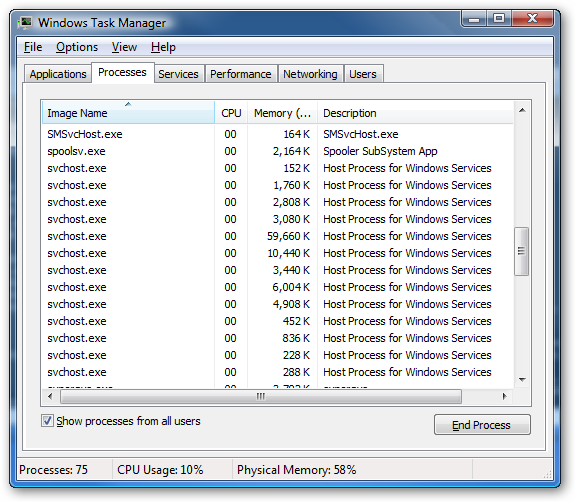
If you are curious what we’re talking about, just open up Task Manager and check the “Show processes from all users” box:
Checking From the Command Line (Vista or XP Pro)
If you want to see what services are being hosted by a particular svchost.exe instance, you can use the tasklist command from the command prompt in order to see the list of services.tasklist /SVC
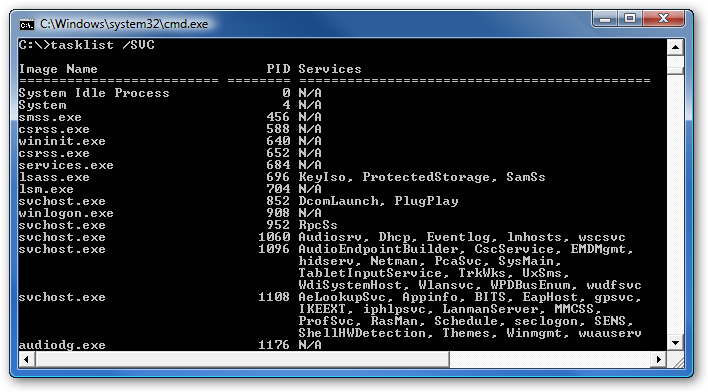
The problem with using the command line method is that you don’t necessarily know what these cryptic names refer to.
Checking in Task Manager in Vista
You can right-click on a particular svchost.exe process, and then choose the “Go to Service” option.

This will flip over to the Services tab, where the services running under that svchost.exe process will be selected:

The great thing about doing it this way is that you can see the real name under the Description column, so you can choose to disable the service if you don’t want it running.
Using Process Explorer in Vista or XP
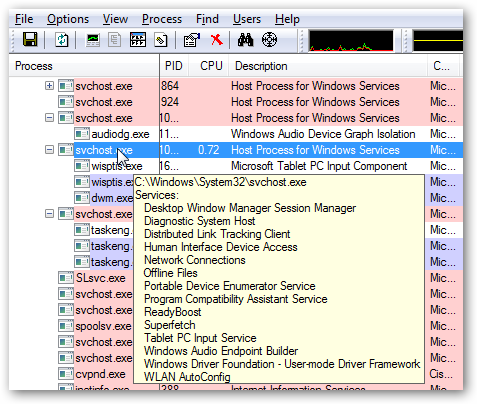
You can use the excellent Process Explorer utility from Microsoft/Sysinternals to see what services are running as a part of a svchost.exe process.
Hovering your mouse over one of the processes will show you a popup list of all the services:
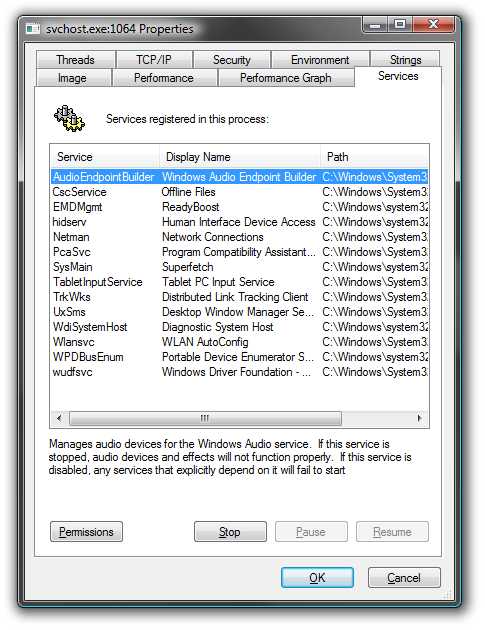
Or you can double-click on a svchost.exe instance and select the Services tab, where you can choose to stop one of the services if you choose.
Disabling Services
Open up Services from the administrative tools section of Control Panel, or type services.msc into the start menu search or run box.
Find the service in the list that you’d like to disable, and either double-click on it or right-click and choose Properties.

Change the Startup Type to Disabled, and then click the Stop button to immediately stop it.
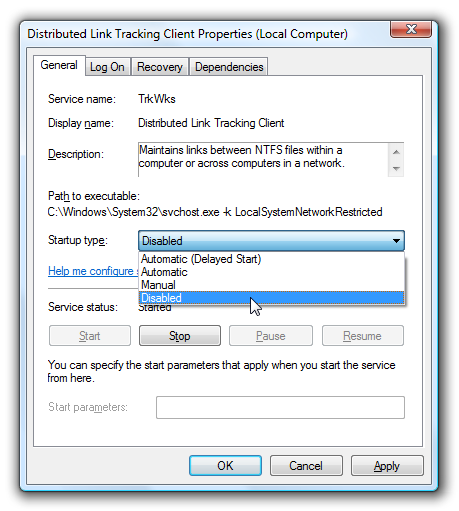
You could also use the command prompt to disable the service if you choose. In this command “trkwks” is the Service name from the above dialog, but if you go back to the tasklist command at the beginning of this article you’ll notice you can find it there as well.sc config trkwks start= disabled
Hopefully this helps somebody!
Reference: What is svchost.exe And Why Is It Running? - How-To Geek


