We had a virus thingy thing a few months back and had to do that system restore thing that you can do with Windows XP, the virus thing has died now but it got rid of our games! like solitaire and spider solitaire.
i cant live without my games
i remember someone telling me that the games are a part of the system package or whatnot and that they should still be in the computer somewhere and maybes the system restore just got rid of the link thing, but i cant find them anywhere!!
if spider doesn’t come up by the process described by Kulfi Wala
go to
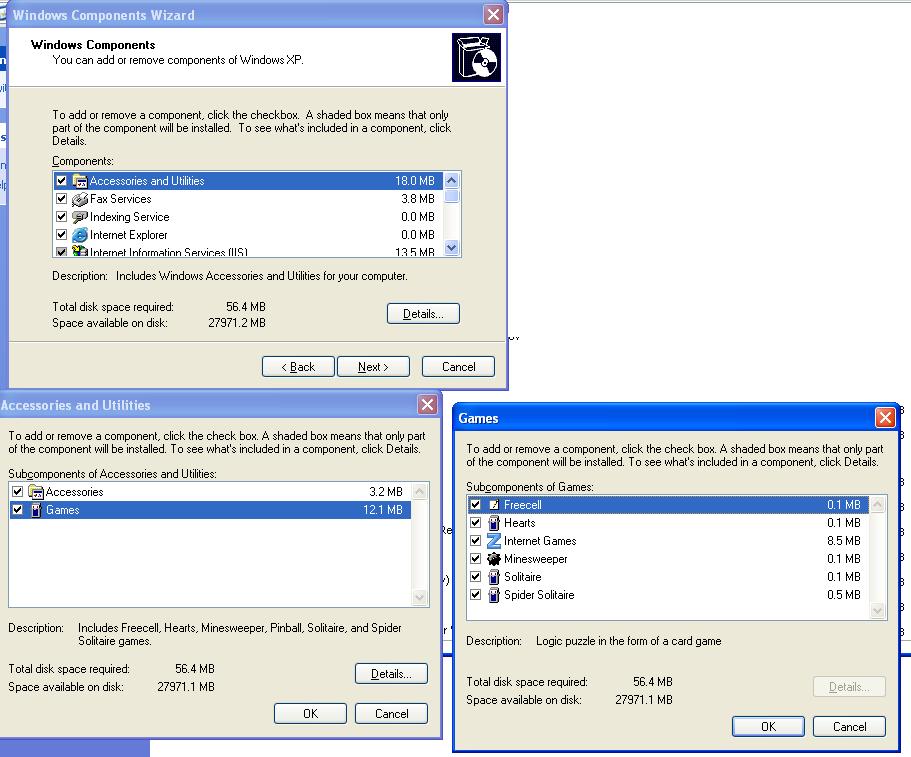
Control Panel–>Add Remove Programs–>add/remove windows components and then follow the screenshot in the link below
i can get the games when i do that start run stuff and i even did what Mr.Genius said, but i cant find them in my list of programmes…like that stuff 5abi’s just said…when i go to start>programmes>accessories there nothing there!!
go to “system32” folder in windows directory… or type “C:\WINDOWS\system32” in the start>>run..
search for spider icon there… right click on icon>>send to>>desktop…


 i am sooo cool