Alright, another one of my naive questions guys. Please help.
I currently have an Asus P5N32-SLI SE Deluxe Mobo with 2 gig Kingston HyperX DDR2 on it.
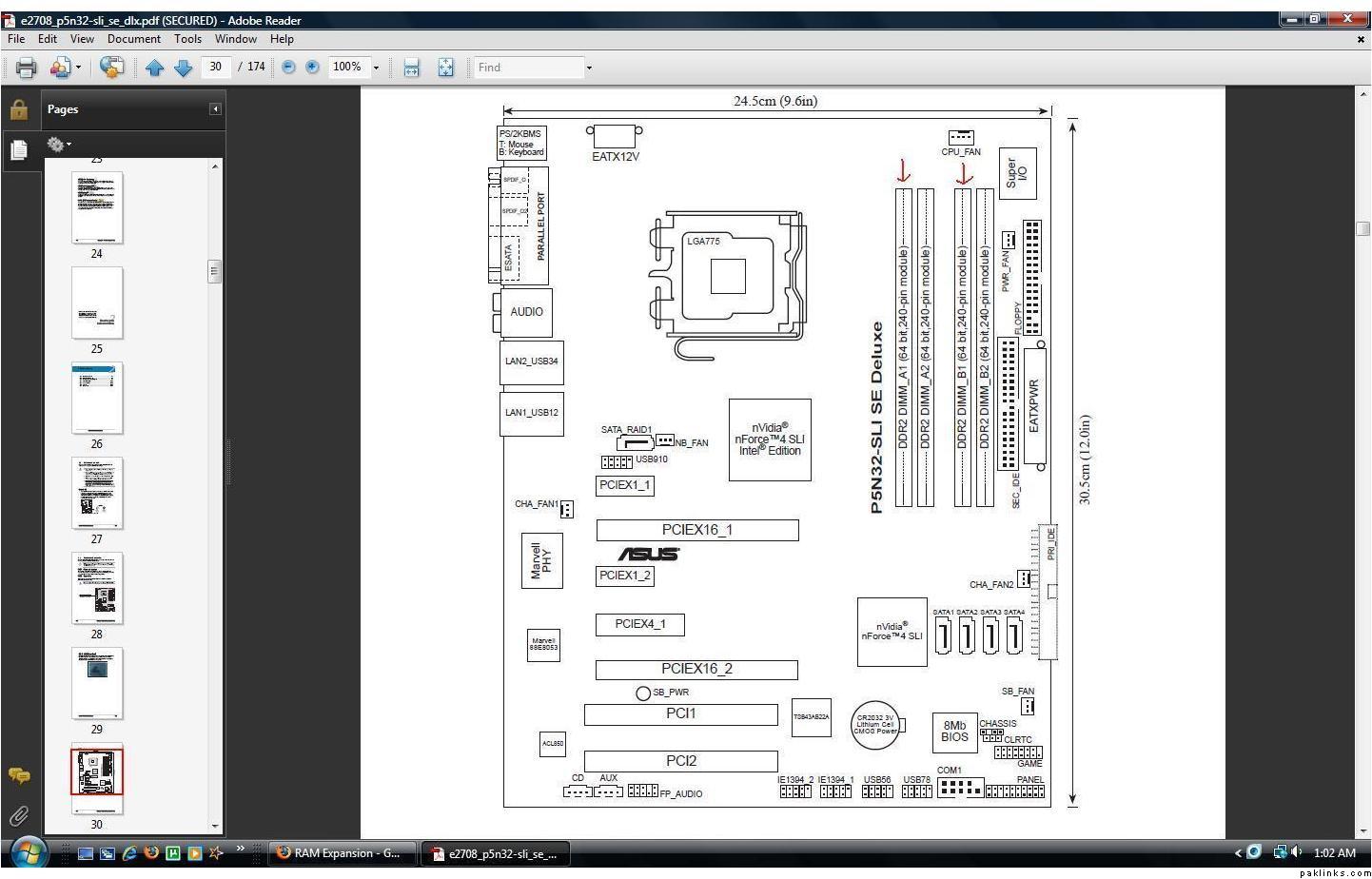
Now i want to expand, the motherboard manual says it supports upto 8 Gig, but the instructions are kinda hazy as to where to seat each stick. The reason i ask is, because i relocated one of the Ram sticks from the blue slot over to black, booted the PC. And it would only register 1 Gig of ram (the one that was not moved).
So, i put the stick back into blue slot (the one i moved to black slot), and the pc registers it. What gives? Now the only thing i could think of was that the black slots support lower capacity sticks, but that wouldn’t add upto 8 gig.
So, how exactly do i expand the ram? I was thinking of going for another 2, 2 Gig sticks of Kingston HyperX to give me a total of 6GB altogether.
That’s the thing, i don’t know how much ram i need. I wanted to expand because 1. I’ll be playing on my PC the next few weeks 2. I’m going to set up Win7 64-Bit in a week or so, so wanted to have plenty of ram available to get the most out of it.
But, can you explain a bit more please. Like how should i use the ram i have now, or do i have to get new ram sticks to make the entire setup work so i can register and actively use like 4 gig, if not more.
I can settle for another 2 gig stick and i’ll be content with a total of 4 gig. I just need to know if it’ll work, and how to set it all up. I’m really bad with slots, etc.
Even if you install 8 GB, the system is only going to see 3 GB, not 4, even if it does see 4, it will only utilize 3.
That said, I would say upgrade to Vista ultimate 64bit and take the damn thing to 8GB and make your life peaceful, again.
Moreover, I would try windows 7 64bit before vista, so if you don't like it or have issues you can format back to vista 64bit without losing much (as it often happens when you format).
Teggy as Nomaan already said, these are dual-channel memory slots. If you try moving BOTH modules to black slot instead of blue they will still work, but you can not use one slot from each pair.
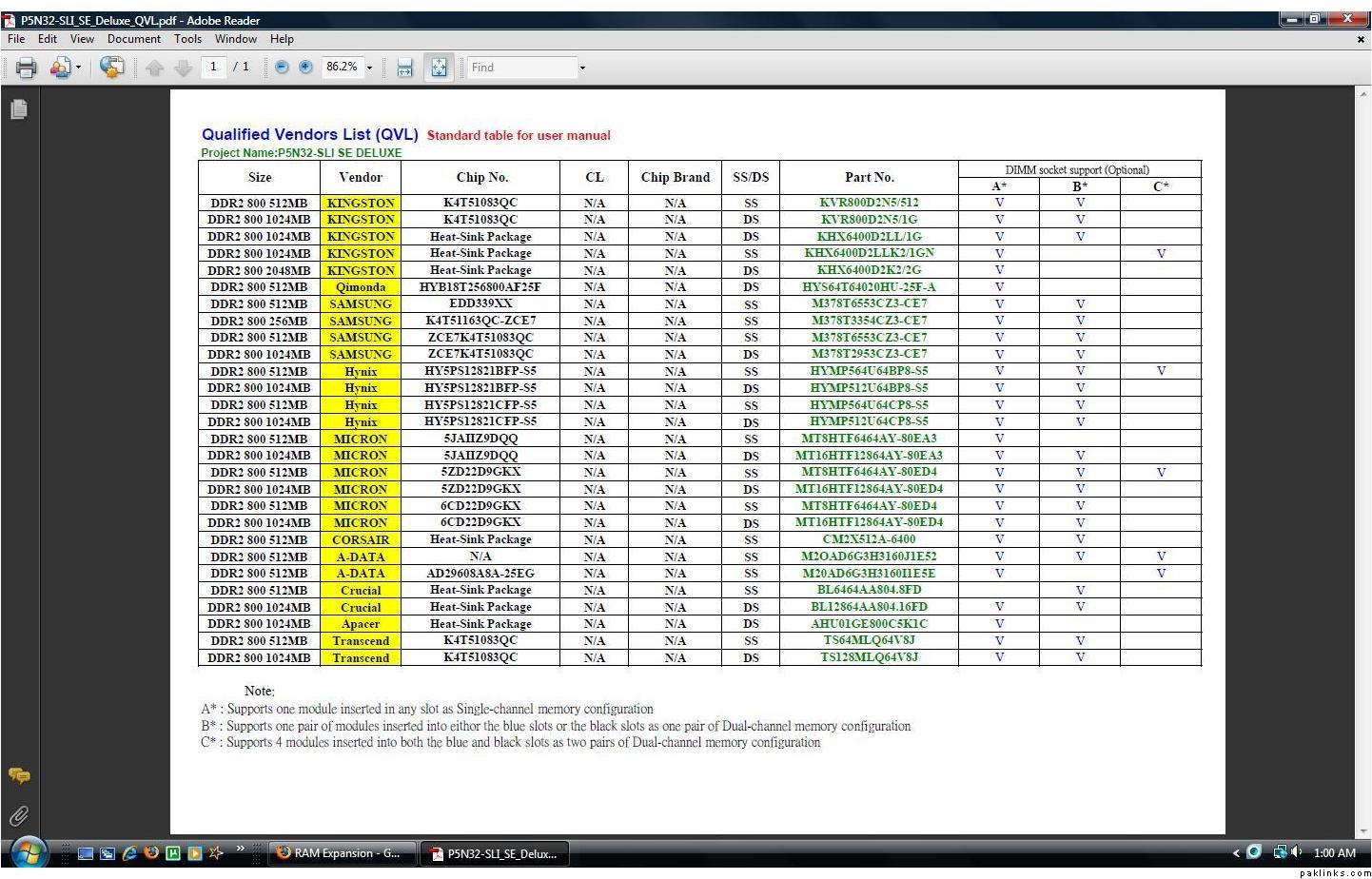
HAving said that, for upgrade you also need a pair. This new pair will go in in unused slots (either black or blue). Make sure that you use identical RAM modules for each pair of slots.
PS: 32-bit operating systems use only 3GB of RAM (although they do detect 4GB).
It’s the same one listed up there (4 gig total, 2 stick of 2gig). Now, from what i understand is that i have to have pairs in the same slots (blue/black), and shouldn’t switch or move them just anywhere, right?
So, if i order this ram, and place it in the remaining 2 black slots, it should work fine? Or do i move the existing rams to black slots and put the new ram in blue slots? (if it makes any difference at all…)
Just put the identical ram modules in same colored slots.
On a side note, What is your CPU?
I've been using Win7 for a months now and this thing is amazing. Rock solid, everything works on it. It is a little bit taxing on my system when I start gaming on it, but my hardware is getting a little old.
So, download Win 7 and use it for a year for free..
Asus P5N32-SLI SE Deluxe Mobo
Core 2 Duo E6600 CPU
2gig HyperX DDR2 (i think 667MHz, but will have to check)
(2)-XFX 8600 GT 512MB DDR2 Graphics set up as SLI
250Gig WD SATA 7200rpm (Primary)
150Gig Maxtor (Storage)
Pioneer DVD Burner
Ultra 700W PSU
Expecting:
4 gig Ram
500GB HDD
And i'll be installing Windows 7 over the weekend.
PS: Thanks br. Nomaan, i just wanted to be sure. :) Thanks everyone
 I wanted to expand because 1. I’ll be playing on my PC the next few weeks 2. I’m going to set up Win7 64-Bit in a week or so, so wanted to have plenty of ram available to get the most out of it.