**Operating System: **Vista Home Premium
**Internet Explorer Version: **7.0.6 Software: Adobe Acrobat Standard 7.0 (After updates were installed, it is now 7.0.9)
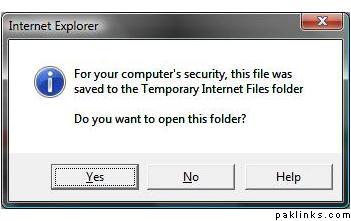
Problem: Well, when I first installed it, it would print to Adobe printer fine and create a file wherever I specified it to be saved. Then I had to reformat my computer because stupid Vista crashed. Then I re-installed Adobe. Now when I print from any other document such as Word, Excel, or any other program to adobe printer, it creates a pdf file without any problems. The problem occurs when I print from IE to the Adobe printer. I will paste the error message below. I searched on the help/online support but couldn’t find anything. That is probably because I didn’t search right. I also called the adobe help center as it came with complimentary tech. support but the dude said they will charge me for support. I would pay but there’s no guarantee that my problem would be fixed because I would have to pay in advance.
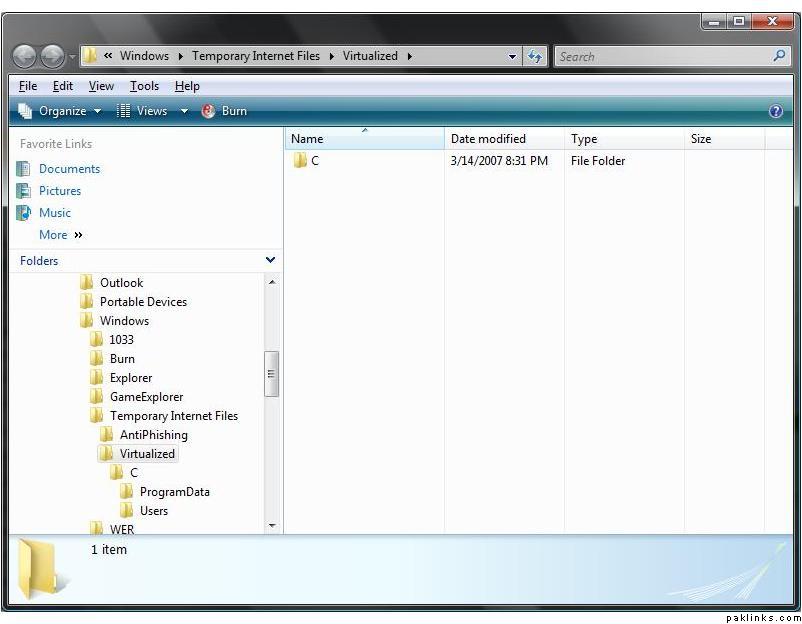
I have un-installed and re-installed it several times. Typical and Full install. Even after removing the registry files. Anyway, anybody knows what the problem is and what the solution is? Here’s the error message and the folder it opens.
Well, that reminds me that I forgot to mention that before I reformatted my computer, I used to print to adobe using firefox. Now my problem with firefox is this:
For some reason, when I open some pages (a few forums of gupshup, cnn, and mostly those that have video files on them), the webpage of firefox starts jumping up and down. If you have a suggestion to stop it from jumping, I can go back to firefox.
Again, firefox was fine before reformatting my computer.
I unchecked the bookmark toolbar and it has stopped vibrating. And ofcourse as before, firefox prints to adobe fine without any problems. The only reason why I had stopped using firefox was because it vibratd and now that it doesn’t, I can go back to it and say goodbye to IE again.
Shikra... just for sake of checking, can you try to run IE in admin mode, i.e. instead of opening IE just by double-clicking the icon, right-click the IE icon and choose Run as Administrator... and then try to print a page using the Adobe PDF driver.
I have a feeling this might work... but its only a temporary solution.
Another thing that might be worth exploring is to get IE to print to an .xps document (MS Version of .pdf)and then save it to a folder. You can then right click the generated file and select convert to .pdf.
Let us know if any of these workarounds actually work.
That's what I had been doing in the meanwhile; IE > XPS > Adobe. At first, I had "do not send fonts to adobe" checked in the print options and xps would look fine, but when I would print it to adobe, it'll have weird characters, but then later I changed it in the options and everything worked fine. Of course I wanted to eliminated the extra step - go to adobe via xps.
Your trick worked! I ran it as administrator and printed to adobe from IE, and it worked fine. I wonder what the logical explanation behind that is?
See, GS has so much brain power (obviously excluding me :D) that you can get an answer to anything. Have you heard that film line; Meri soch wahan shiroo hoti hai jahan tumhari soch khatam hoti hai............same is true for GS. Its help starts where the professionals' help ends.
I would like to know why it prints when run as an administrator as opposed to as a user and I have no additional users set up on this computer. I am THE one using it.
The most annoying one is the “irql not less than equal to”. I get that almost every time I turn on the computer. Now I am starting to get a couple more that I can’t remember off the top of my head, but one of them is a weird one: #########x##
I googled all my error messages and checked vista site, looks like I am not the only one facing these issues. I am desperately waiting for the patches.