Appears as unpublished. Sent PM requesting clarification. No response - probably recipients busy. Please Help at your convenience.
Re: posted an article
And yes what is a tag?
Re: posted an article
Anyone home? Could use some help.
Re: posted an article
Apologies for the delay. Article is published now. Under “Publishing Options”, you forgot to check “Yes” for published. “No” was checked instead. I took the liberty of changing it to “Yes” and it’s published now. Since you’re in a different time zone than me and most other admins, please give us at least 24 hours to respond back to your queries.
Tag is like a label(s) for your article. If I’m posting an article on make-up, for example, my tags could include words like beauty, shopping, fashion etc. This way when users search for articles related to beauty, my article will pop up in the search.
Re: posted an article
Thanks. No issues. I was more frustrated at my lack of savvy wrt publishing etc.
Re: posted an article
One more article waiting. I did not see any option for Publishing - yes vs no. Also tried to enter tag - wouldn’t let m.
If possible enter for Tags
Asset allocation
stocks
Bonds
cash
Gold
Real estate.
Re: posted an article
Forgot to add - Thanks!
Re: posted an article
When you are editing the article, the publishing options appear on the top right hand side. Select yes and save.
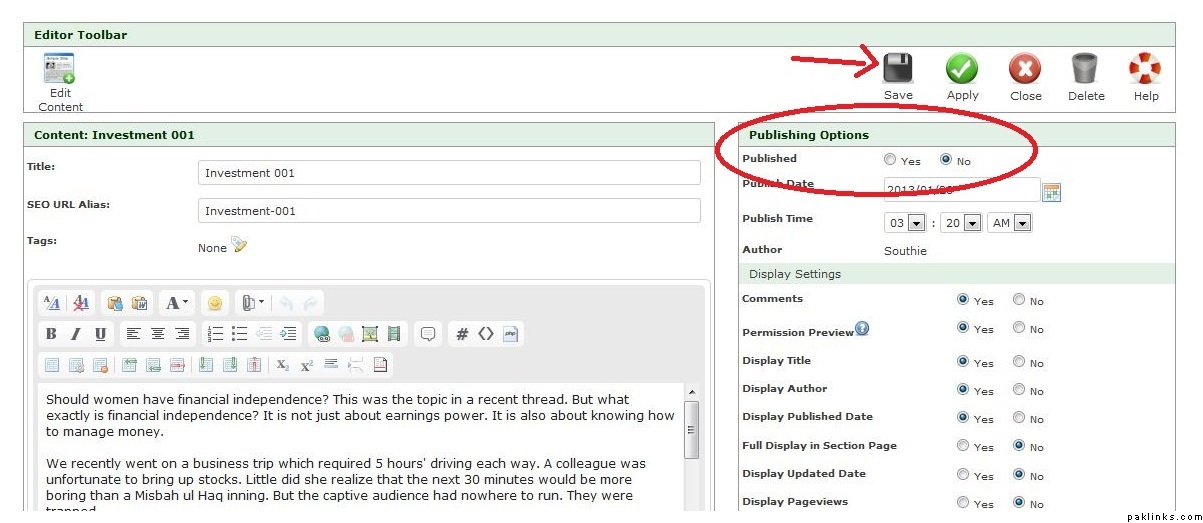
To add tags, click on the little pencil icon that appears in front of the Tags row. You see it in the above screenshot. There’s title, then SEO URL Alias below that and then Tags below that. Where it says none, there’s a little icon in front of it that you have to click to add tags.
Re: posted an article
Thanks a lot, Huma. Strong buy rating reiterated!
Re: posted an article
For Kindle Fire users, there appears to be a glitch. While editing, I don’t get the Publishing option. So cannot choose yes.
Re: tags, I did click on the tag. The typing box appears. But the moment I start to type, the box disappears.
So another article in waiting.
Suggested tags : dividend yield, 10 year Treasury, stocks, bonds, relative valuation.
Thanks as always!
Re: posted an article
Thanks to whoever took care of this.
I wonder if the limitations wrt Kindle Fire ( and presumably other mobile devices) can be addressed by the computer whiz guys/ ladies).
Re: posted an article
publishing options are only available to Editors.
Re: posted an article
Thanks Azkar.
I think some of us are still confused. When we write an article ans save it, does it automatically go in a queue? And one of the reviews it within a day or two?
Or should one come here and post in help forum to let someone know
Re: posted an article
sorry. we are still working out the details. for the more experienced users, the content will be auto published. new comers will be held. i have been away for a few weeks and as you can see, there are no associated pictures. i like to have at least one or two representative “open source” graphics to illustrate the article. i will edit a few. i hope to some day soon write a comprehensive tutorial and how-to. bear with me.
Re: posted an article
No problems! Thanks!!