What temp do you guys get? I keep getting 70C and I am scared if it fries up anything!
I don’t know what the solution is! It freezes my games or whatever I am doing too at times
What temp do you guys get? I keep getting 70C and I am scared if it fries up anything!
I don’t know what the solution is! It freezes my games or whatever I am doing too at times
Re: Overheating laptop
Make Model Year OS of the laptop please

Re: Overheating laptop
mine stays at where it is right now, 55-58.
When I play movie on full screen, it goes up to 65+
For you my science says, don’t put laptop on the bed.
Let the air flow under it as well. Put some book or some thing under it.
Re: Overheating laptop
Here you go!
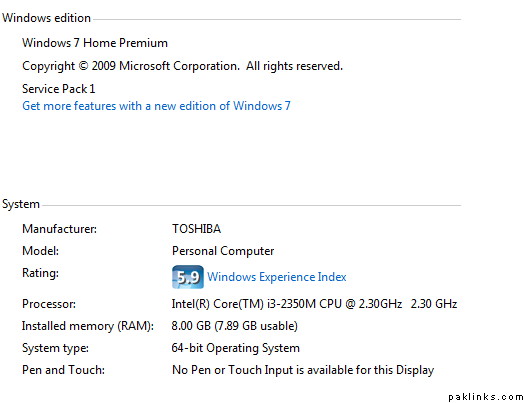
Re: Overheating laptop
Monk tried all that 
Re: Overheating laptop
reapply the thermal paste on heat sink and processor
or
buy USB Cooling Pad
Re: Overheating laptop
Where do I get thermal paste from?
Re: Overheating laptop
^do this shak.,
first one first. if that dont fix then buy fan.
Re: Overheating laptop
should be available easily from any computer shop.
Re: Overheating laptop
just make sure you dont end up with extra screws once you put your laptop back togather.
Re: Overheating laptop
 I know…
Re: Overheating laptop
ps: for my HP craptop reapplying paste didnt work as it was suppose to.
Re: Overheating laptop
cheap N easy solution. buy one of those laptop cooling pads with fan for less than $10 and place your lappy on it when it gets hot. it’s super quiet.
Restored attachments:
Re: Overheating laptop
Which software you guys use to check the laptop temperature?? 
Re: Overheating laptop
SpeedFan
Re: Overheating laptop
I ALWAYS have extra screws left over lol
Re: Overheating laptop
thanks teggy bhaiyya
Re: Overheating laptop
75 C with gaming is not bad. I don’t think that i3 processors have turbo but I had to turn the turbo boost off in settings on my AW and now the rebuilt machine doesn’t turn on the fan all the time. Back before the BIOS setting change, the machine would turn on the fan even when I had no browsers open by just logging in the computer. If you do get a fan, get the big one (one big fan) compared to the 3 small ones on a pad as the big one is much better. Something metallic might also help to take away the heat but cooling pad really won’t solve your problem.
