Microsoft Access Database Helpppppppp.....

Can someone here help me with access? I want to pull data after I select "Permit Type, and search by “Permit Number” and then rest info automatically after I make the selection like:
Facility Name:
Address:
City:
State:
Zip Code:
Permit Status:

I want to use Macros,but no VB code.

Please help.

Re: Microsoft Access Database Helpppppppp.....

Tough to answer that question without knowing anything about the schema of your database. Can you provide some more details? That way someone can help you break down the problem.

Re: Microsoft Access Database Helpppppppp.....

Select "Permit Type" from drop down: AP, APCF, GDO, IW5, IW6, or PSO Type "Permit Number": 1 or 2 or 3 Click "Search Record"

then After I made above selection then display automatically below info:

Facility Name:
Permit Status:
Address:
City:
State:
Zip Code:

PS: there are about 44,000 record.

Re: Microsoft Access Database Helpppppppp.....

@SaeedinPakistan

Re: Microsoft Access Database Helpppppppp.....

Uff.this access is still alive? Why is your company using it?

Anywaz, see if you can take screenshots and upload

Re: Microsoft Access Database Helpppppppp.....

kia hai itni info tou di hai :(

Re: Microsoft Access Database Helpppppppp.....

wouldnt you have to write queries there?

Re: Microsoft Access Database Helpppppppp.....

What is the name of table in database?

Re: Microsoft Access Database Helpppppppp…

btw, I am using filtered query for form.

Re: Microsoft Access Database Helpppppppp.....

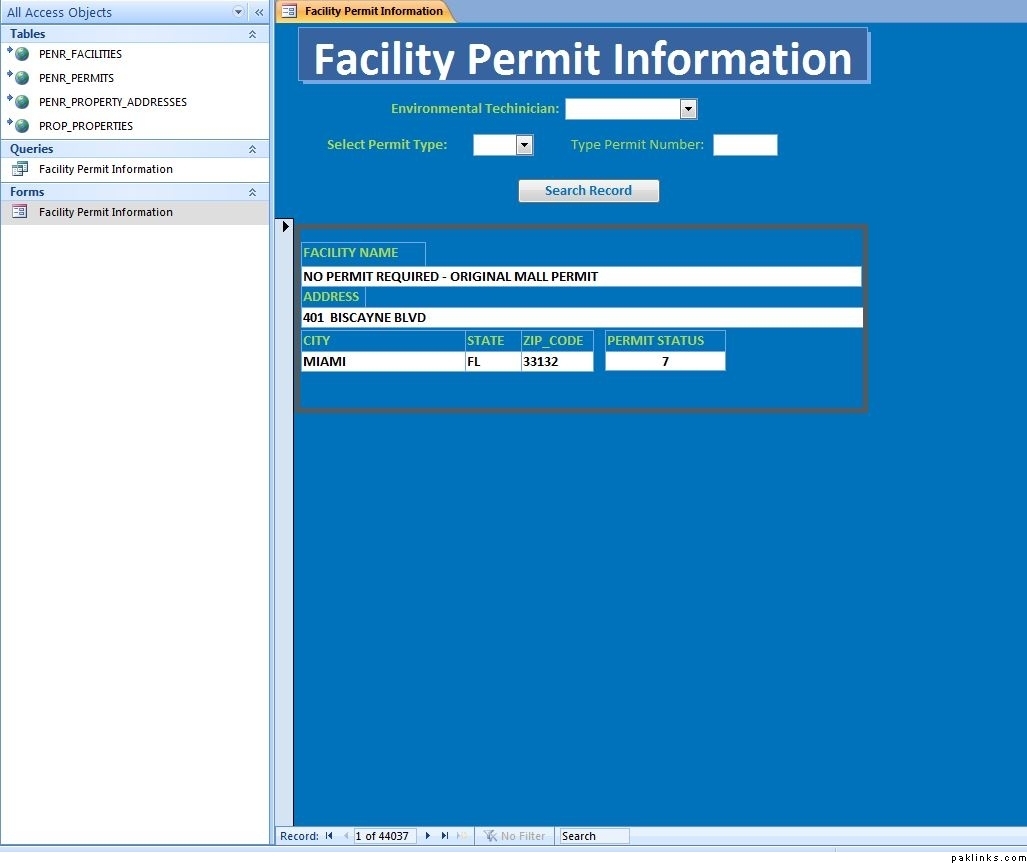
The data which is in bold text.. what is the name of that table?

Can you please share the structure of that table?

Re: Microsoft Access Database Helpppppppp.....

@mahool
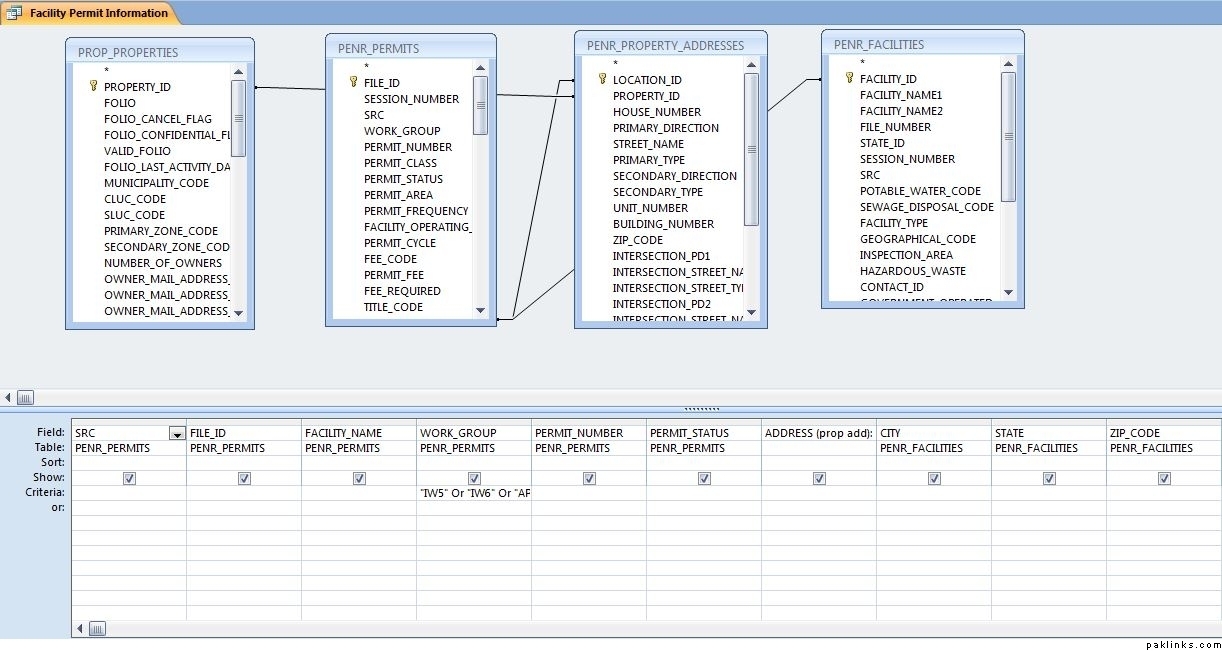
plz chk screenshot. 4 tables combined for query.

Re: Microsoft Access Database Helpppppppp…

query:

Re: Microsoft Access Database Helpppppppp…

Your filter column:
Permit Number is in Penr_permit
Permit type is in …which table.

Data you want to select based on above filters…

Facility Name: Penr_facilitis
Permit Status: Penr_permit
Address: …which table
City: …which table
State: …which table
Zip Code: …which table

Re: Microsoft Access Database Helpppppppp.....

As i mentioned before there are about 77,000 records so then i made query to filtered.

Work group = permit type its in "Permit" table.

"Address" combination of 4 tables.

"City, state, zip code" in penr-facilities table.

**Tables and field are from other program which I can't delete.

Re: Microsoft Access Database Helpppppppp.....

"City, state, zip code" is in penr_property_addresses

Send complete list of files of each table. I can not write query without knowing filed name.

This is very simple query... you need to make join... accordingly...

Re: Microsoft Access Database Helpppppppp.....

Can you get this data in Excel? I can help you there.

Re: Microsoft Access Database Helpppppppp.....

@mahool i need help in form not query.

I want to pull record in form from query not from tables.

Did you see screenshot of my form above?

In form select "permit type" from drop down then type permit number then hit find record command button. SO those two combo and command needs Macros.

Thanks

Re: Microsoft Access Database Helpppppppp.....

Yea its the macros S08 needs help with. Our tech gurus @us1415 @NaMaan or DMD may help

Re: Microsoft Access Database Helpppppppp.....

If its your job not for your own business...i say bug your office IT SUPPORT.
i abandoned access long time ago because of |MS arrogance aka access database comparability between their own different versions.

sovy!

Re: Microsoft Access Database Helpppppppp…

Generally speaking, you want to provide A LOT more info (or better yet, give access to your database). If you want to send it to me privately, I can do it for you (much easier than arbitrarily tell you step by step - because I don’t use MSaccess so much to remember everything from top of my head)
Anyway here goes:

(I am assuming you know how to make Macros. I am not adding any error checking / handling, which really should be added - e.g., when textfields are empty or non-normal values)

I am assuming the form has “Record Source” is properly setup to Query / Table.

I am assuming the Permit Type Drop Down in the form is setup with 2 fields (0 = ID, 1 = Name)!

  • Create a new macro
  • Choose ApplyFilter
  • WhereCondition= [Permit Type] = cboPermitType.value and [Permit Number] = txtPermitNumber.text

Since info is not given, I just assumed all the things that I don’t know - and gave you the answer. Change it as needed (according to name of your fields) and hopefully it should give you a step in right direction.

Feel free to contact me if you need any help.