lol, I dont know how, but we have lost the address panal, where you type the site addresses in M I Explorer.
Its getting boring getting the sites through google, please help.
Re: lost the address panal/line
When u open IE, on the top menu, next to help .. in the empty space, right click & then select "Address Bar". You will have ur address bar back.
:)
Re: lost the address panal/line
^-- if the above still doesnt help, then:
Sometimes it goes hiding nex to the menubar or something, so you can "drag" it back to its position by doing the following:
Re: lost the address panal/line
Nice try, but its still lost!
See, it’s grey → Adresse
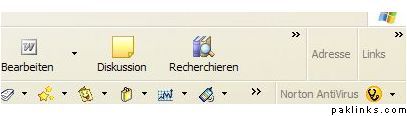
Re: lost the address panal/line
Saadia, I was right.
do as I instructed above, it'll be back.
Re: lost the address panal/line
oh wow, now its back, thanks Gizzy and Najim!

Re: lost the address panal/line
gut getan :biggthumb
Re: lost the address panal/line
:DDanke
Now that I have your attention, I have another question.
When we bought this laptop, it had AntiVirus Norton installed, now its out of date and not protecting anymore, anyway this Norton gives us some problems with starting the Laptop, so I want to disinstall it, but there isnt any Disinstall button in the program, my sis told me not to do it over 'Systemsteuerung' so how shall I do it?
Re: lost the address panal/line
^-- Go to "Contol Panel"
and then "Software" icon in the control panel, that will allow you to de-install Norton.
Yes, its a wise choice to get rid of it!