i have many images in my html page, i have named all with html name tag…
like, also i use javascript alert function to display its name in a message box
< img src = “Gallery/Pic01.JPG” alt=“Click to View” border=“2”
name=“roompic01” onclick=javascript:alert(this.name); >
this image display in an iframe in html page
I want the name to be appeared on the top/bottom of the image, that is any location in parent page
there might be 10 images, is there any way that i can update this name while any image is clicked
I could call the onclick methoed of javascript & image changes in iframe
also its name changes on its top.
name might be in any layer or any label.
can any1 help me in this issue.
Re: javascript question
so, no 1knows about javascript or web design...etc
Re: javascript question
i have many images in my html page, i have named all with html name tag...
like, also i use javascript alert function to display its name in a message box
< img src = "Gallery/Pic01.JPG" alt="Click to View" border="2"
name="roompic01" onclick=javascript:alert(this.name); >
this image display in an iframe in html page
I want the name to be appeared on the top/bottom of the image, that is any location in parent page
there might be 10 images, is there any way that i can update this name while any image is clicked
I could call the onclick methoed of javascript & image changes in iframe
also its name changes on its top.
name might be in any layer or any label.
can any1 help me in this issue.
Can you clarify what you mean by "update" this name? Update how?
You need to explain your logic a little better. Give us a sample use-case and I'm sure someone can help you...
Re: javascript question
Yes I can
suppose
there r 5 images
there names are…
pic1
pic2
pic3
pic4
pic5
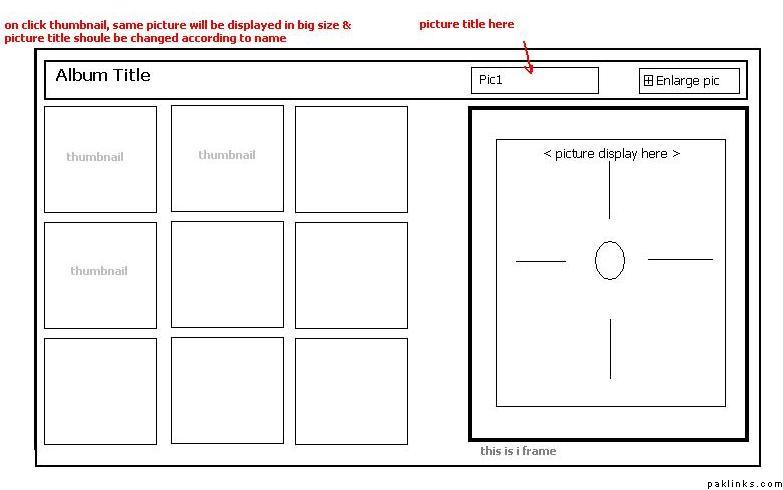
there is a title of each image displayed on its top (top of iframe)
when i click pic1, the title should be pic1 & the iframe will display pic1 into it
when i click pic2, the title should be pic2 & iframe contain pic2 inside it
& so on …for all images…
Checkt the attached picture…
Re: javascript question
Here you go:
PS: A little google goes a long way! 
Re: javascript question
I wrote a quick script (its not even a full-fledged script… just a function call)
which I think does what you’re looking for…
The page is uploaded here:
http://www.umar.biz/gallery-test/test.htm
You can view source to see the logic… I’m using “InnerHTML” property to change the DIV text. Lemme know if this is the sort of thing you wanted.
Re: javascript question
Umer bhai. I feel it will work for me...Great job bro
Let me check it.....................however....Thanks A Lot...
Re: javascript question
Well brother, do this work in an ASP/Vb Script page...?
or we must use Asp/javascript page... because I think function call is not working well with my Asp/vbscript...