Palm gets back into the game with touchscreen Pre, WebOS
Thu Jan 8, 2009 4:10PM EST
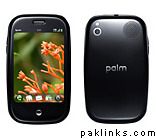
Palm was under serious pressure to hit a home run at CES today—and boy, did it deliver. Running Palm’s gorgeous (if belated) new platform, dubbed WebOS, the touchscreen Pre could well be Palm’s savior, and perhaps its biggest hit.
So, as for the Pre itself (due on Sprint in the first half of this year, no pricing yet): It’s got a big, 3.1-inch 480 by 320 touch display (yes, with multitouch and an accelerometer), weighs in at 4.8 ounces, and comes with a curved, slide-out keypad. Yes, it does Wi-Fi and 3G (EV-DO Rev. A, to be exact), as well as GPS (with turn-by-turn directions courtesy of TeleNav), stereo Bluetooth, 8GB of internal storage, a 3MP camera, a 3.5mm headset jack, and a removable battery.
But the key to the Pre is its OS, and WebOS—previously code-named “Nova”—is one of the hottest mobile platforms I’ve seen yet, rivaling both Android and Apple’s iPhone OS.
At a glance, WebOS doesn’t look all that different from the icon-driven, touch-based Android and iPhone platforms; you’ve got your main, wallpapered home screen, complete with a row of icons along the bottom for your standard e-mail, calendar, and calling features.
But Palm’s done a few key things differently here, starting with the “gesture” area at the bottom or side of the screen (if you’re, say, surfing the Web in landscape mode). For example, if you’re browsing an individual contact in the Pre’s address book, you can flick horizontally in the gesture area to go back to the contact list, or you can flick up for a translucent window shade of applications. Nice.
More importantly, though, is WebOS’s way of letting you handle and sort all your open applications like a deck of cards. If you’re composing an e-mail, for example, you can flick up, call open a new application, and then return to your e-mail at any point. All open applications appear as windows (similar to the windows in the iPhone’s Web browser), and you can flick back and forth, reorder them, and discard them at will.
That’s really cool, and it solves one of the biggest problems that’s dogged the iPhone—namely, that its various applications are all walled off, making it difficult to easily switch from, say, the Web browser to the calendar and back again.
WebOS also introduces a concept dubbed “Synergy,” which all applications can continuously get info from the Web. The best example: WebOS’s unified contact list, which seamlessly displays all your contacts and grab their e-mail addresses, phone numbers, and IM handles from Facebook, Gmail, Exchange, you name it.
I’m also happy with Palm’s integrated messaging interface, which combines IM and text chats into a single, threaded conversation.
Right now this is the ‘front-page’ story at Yahoo.
This Palm device comes with QWERTY keyboard and full screen touchpanel, multi-application support unlike iPhone which supports one application at a time?
Also being discussed at Engadget: http://www.engadgetmobile.com/2009/01/08/there-will-be-a-umts-palm-pre/