As some of you might already have noticed, the “attachment system” which was enabled since the last upgrade and the absence of the UPLOAD tool, which was not working for a long time now and due to which many guppans have been having nightmares. Well, that upload tool is back again!!
It is not entirely the same tool (it was rewritten by our Azkar pai) and you can find it at the same place as the “manage attachment” tool belon the “New Reply” box OR to the right of your screen in the new Quickie ‘sidebar’.
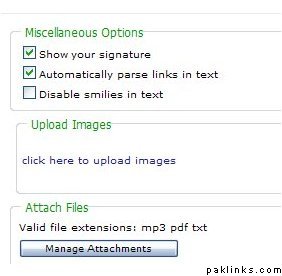
The “manage attachment” which you have been using so far (since the upgrade) does not allow uploading images anymore! Some guppies have still been trying to do so. Eventhough it clearly states the types of files allowed.
as shown in this screenshot: (the new image uploader is now at the top of the "manage attachment"button)
The last link in the quicki bar (on the right) is Upload. Click it and another window will pop up where you can upload images, just like we used to be able to before that new attachment thing came with the new version.
I know we’re not supposed to post external links but i cant post an image any other way so here it is. This is what pops up when i click on** Upload**. And i think my browser settings are at medium etc.
When you click on a the link within a thread after you press "REPLY" then it sometimes gives this error (it still needs some fine tuning)
So I suggest, always use the upload link which is in the Quicke side bar.
 is khushi mein mere paas koi tasveer bhi nahi upload kernay ke liye


 i m confused