Dear Mod,
I’m unable to upload any image. It seems you have problem in attaching image. Please check and respond.
Thanks in advance,
Sannan
Dear Mod,
I’m unable to upload any image. It seems you have problem in attaching image. Please check and respond.
Thanks in advance,
Sannan
Re: Image Uploader Problem
I have just checked it, Sannan. It seems to be working appropriately for me.
Please check your browser settings and try again. When you are uploading images, please wait for the image upload button to become available, it takes a few seconds.
You can see below before the button is available, and after it is available at which point you should be able to click, browse, and upload images.


I hope that helps. If you continue to have issues, please report back here and we will do our best to help you.
**Thx for your response Teggy when i clicked first button Select multiple files it just got Disabled and nothing happened. I've tried mozilla & IE both but nothing working.
Even i m facing problem to using Manage Attachment.
Waiting for some solution.**
Re: Image Uploader Problem
I do apologize for the inconvenience you're having. Please remain patient, i will try and find out if there's something that can be done on our end.
Re: Image Uploader Problem
Sannan, could you try it from a diff computer and report here again if problem continues
Uhm, can i just say that the image uploader button has disappeared for me, totally… 
Re: Image Uploader Problem
amazing .. it took me 3 sec tops, to upload all these files right now using Mozilla .. let me try IE






Re: Image Uploader Problem
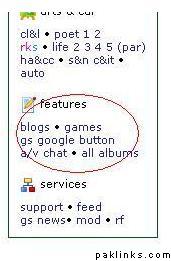
I have tried IE, Chrome and FF… i actually don’t see the button under the features section…
Have you guys moved it without telling me? 
Am trying using my non-admin multi and IE …
ok, select multiple images button disappered (rather truned into a red strip) but when I clicked that red strip, it still worked



Re: Image Uploader Problem
:bummer:
Ok here is what i see: (i was looking for the image uploader to upload this, i’m losing it :smack:)
http://i26.tinypic.com/xkzjw1.jpg
Also, when i “go advanced” with my reply, i clicked on the image uploader button on text editing area, and i just see the following text “javascipt:mediapopup()”
… on the IE text display bar down at the bottom of the page.
check if you can click this link
Re: Image Uploader Problem
Yep that link works for me, thanks :k:
Re: Image Uploader Problem
I think you need to clear your cache/cookies stuff ..
Re: Image Uploader Problem
still not ..........
Re: Image Uploader Problem
Oh in chorme its working and now i am checking that it will upload the files or not ....
*Nope its not working and i've given up :( *