**Assalamuelekum
Thanks to teggy I burn a bootable Windows Xp Pro + SP2
now can anyone please guide me to clean windows install step by step with screen shots? and which method to choose NTFC or FAT or FAT32 …?
**
**Assalamuelekum
Thanks to teggy I burn a bootable Windows Xp Pro + SP2
now can anyone please guide me to clean windows install step by step with screen shots? and which method to choose NTFC or FAT or FAT32 …?
**
Re: How to install Micr0s0ft Wind0ws Xp Pro?
Bootbale disk should give you option for a format ... if you do a full format , that should clean your hard disk.
Pick NTFS
I am not sure if Teggy can do screenshots ... first he has to do a fresh install in his computer to do that ..
Second ... he has to take camera pictures casue during install which may not show up prett good
Re: How to install Micr0s0ft Wind0ws Xp Pro?
When you boot and it goes through the steps of detecting the hard drive, etc..etc...when you've selected where you want to install the windows on the partition.
It will then ask you NTFS (Quick)
or
just plain NTFS and/or FAT32
just select NTFS (Quick), it should take less than a minute, it will reboot again...this time do NOT do anything. even when prompted with the same boot message (Press any key to boot from CD.....)
It will go past that message (IF you get it at all)...and it will continue through the rest of the installation...should take about 20 mins or so.
Re: How to install Micr0s0ft Wind0ws Xp Pro?
I can do screenshots of the installation and not use an external camera, but its just too much work.
Use NTFS, and it should be a clean install. Don't try disabling services and such or u may get stuck, specially if you don't know what you are doing. Make sure you have the drivers for all the hardware. You can actually integrate the drivers using nLite so you don't have to go a-looking. nLite is very straightforward so you shouldn't have any problems.
Re: How to install Micr0s0ft Wind0ws Xp Pro?
Yoooo TB! vLite was a success too…
i think 
I’ll have to wait n see later on tonite when i get my new board…
Will upload those too.
Thanks for ur help though bro.
Re: How to install Micr0s0ft Wind0ws Xp Pro?
My pleasure
Re: How to install Micr0s0ft Wind0ws Xp Pro?
Teggy .. when you do quick NTFS, does not it just create another folder on your existing drive without over writing previous data .. and now your computer becomes a dual boot machine , with older and new OS both present
Re: How to install Micr0s0ft Wind0ws Xp Pro?
no.
It just wipes the entire drive. I've always done NTFS (Quick) and i don't see any traces of a previous install/files/folders....
It boots as the primary and single OS as if it were a fresh install.
Re: How to install Micr0s0ft Wind0ws Xp Pro?
Thanks Teggy and TB ... appreciate your posts and "how to's"
Now I am anxiously waiting for your vlite post :)
Re: How to install Micr0s0ft Wind0ws Xp Pro?
You're welcome TLK.
inshaAllah by tonite or tomorrow for sure! :)
Re: How to install Micr0s0ft Wind0ws Xp Pro?
The difference between quick and regular format is that in quick it doesn't do a chkdsk to check for bad sectors. Both of them delete file handles. So files can still be recovered.
Re: How to install Micr0s0ft Wind0ws Xp Pro?
Here are a couple of screenshots:
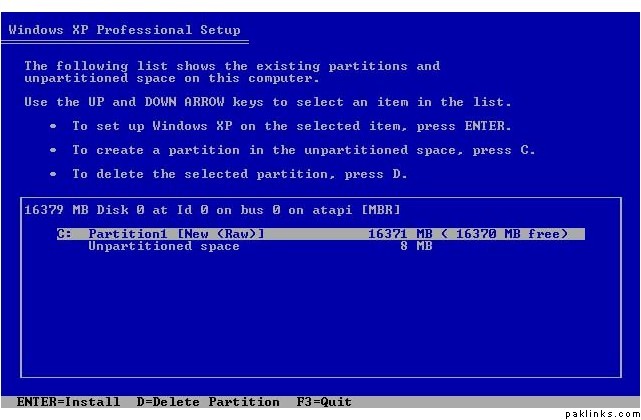
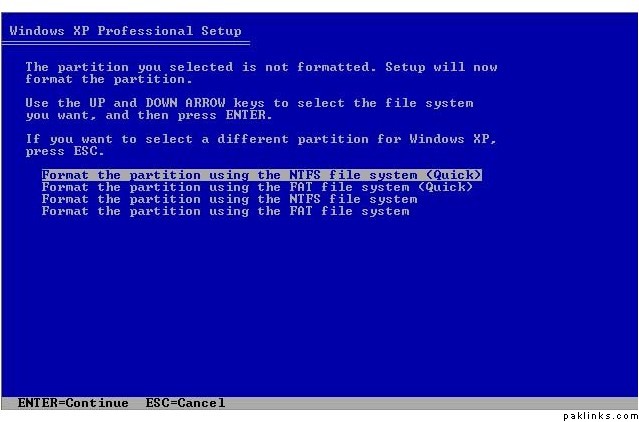
Re: How to install Micr0s0ft Wind0ws Xp Pro?
Thanks alot everyone....very helpful