How can i post pictures on this site?Idk if we’re allowed to, but according to the user Ethan Hunt, my post count has to reach a certain level in order for me to post pictures; so it would be nice if any moderators could tell me what the magic number is?Idk if he’s sh**ing me, or if it would be possible for me to post pictures.
Re: How can I post pictures?
I was probably *** on you 
As shak bhai has suggested, use the image uploader but i’ve and some other people have had similar problems at the start so we always have had to use it.
Sorry for any inconvenience bro
Re: How can I post pictures?
There is a quickie menu on right side of the page (under about me box). Below** Science & Technology** you have **Feature **heading. Under this heading you have ***images uploader.
***Once a separate pop-up window opens, you can select the images that you want to upload and click on start uploading button. After the process the page will refresh and you will have the codes of the images. Click the copy button and past it anywhere you want them in your thread.
Viola, that’s it!
Re: How can I post pictures?
So much tsk tsk.
Re: How can I post pictures?
alright, thank you for the detailed comment, but why can’t i just upload pics with the url; downloading pics onto my computer and then up here is a BIG p.i.t.a
Re: How can I post pictures?
That’s the main problem bro. We get an image icon on the top. Here’s how I post.
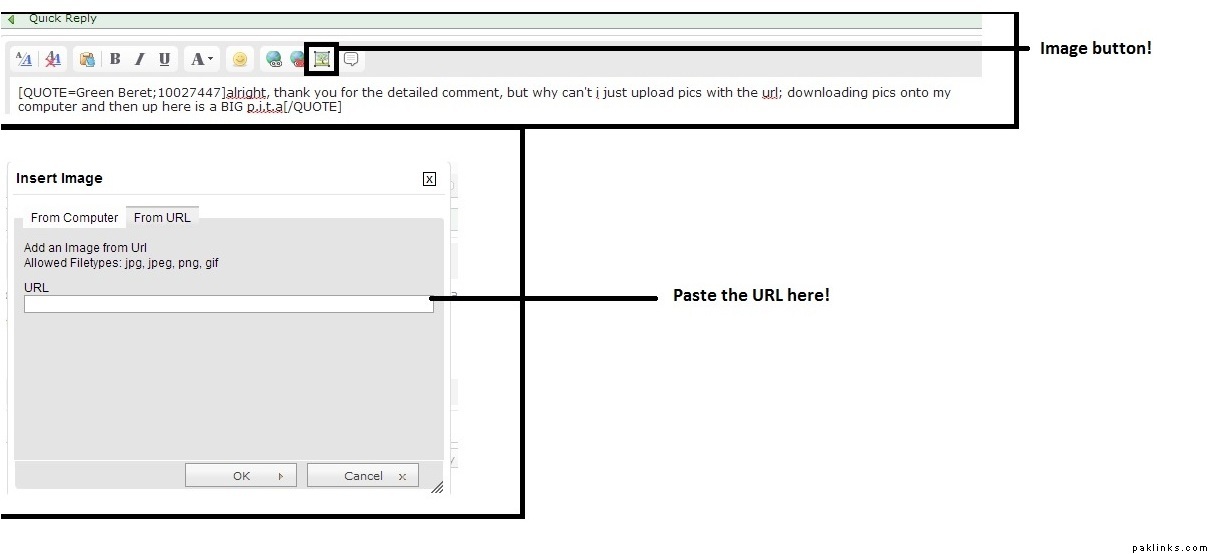
Jaldi jaldi banaya, sorry for the poor quality.
Re: How can I post pictures?
I’ve seen that image icon before, but i don’t see it in every section for some reason.
Re: How can I post pictures?
Start flooding in cafe until you reach 300 posts, it may work then. I seriously don’t know the problem with this.
Re: How can I post pictures?
alright, these mods are acting like typical brown parents.

Re: How can I post pictures?
In link see detailed image and/or video to upload an image (image shouldn’t exceed 1MB size and also shouldn’t hold .png extension).
http://www.paklinks.com/gs/images-central/447381-how-to-upload-images.html
Re: How can I post pictures?
I have over 800 posts but in some forums I do not have such uploading function. Like in Humour section there is no such option. But in Computer & Information Technology I have this.