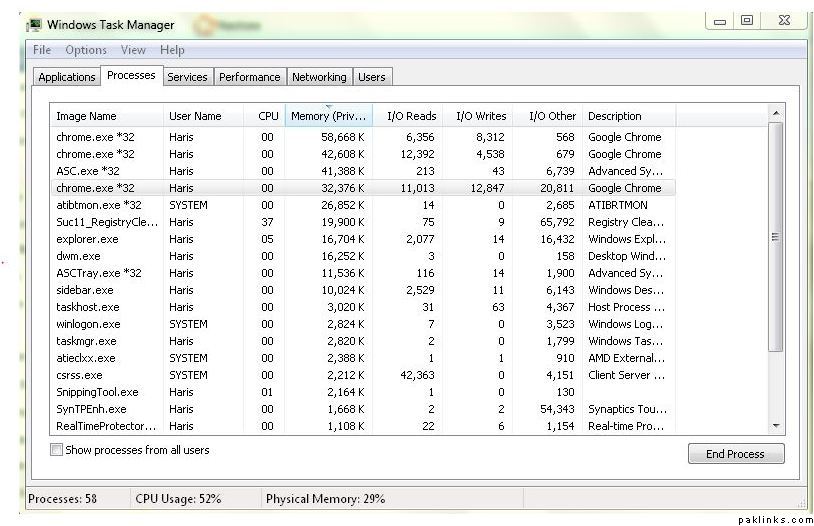
My brother’s hard drive has recently begun spinning for apparently no reason. I reboot and disable extra items in Win 7 (via msconfig) and after reboot the system idles fine for a while. But in less than an hour, it starts spinning really fast and it will keep spinning fast for hours, if I let it.
There’s no applications running in task manager either. He’s not a techy guy and asked me what could be causing it. I thought to ask here. Any help would be appreciated.
Task manager< Processes. Click on the “VIEW” tab, Click “Select Columns”, Check the boxes for I/O Reads and I/O Writes. Click “OK”.
Task manager will now display programs that are accessing the hard drive and you can see what is causing your problem.
Once you identify the programs that are causing this issue try running anti spyware and anti virus to make sure there isnt a trojan running with the programs. Also see if your HDD is running indexing.
Suc11_RegistryCleaner.exe is known as Registry Cleaner and it is developed by IObit . We have seen about 10 different instances of Suc11_RegistryCleaner.exe in different location. So far we haven’t seen any alert about this product. If you think there is a virus or malware with this product, please submit your feedback at the bottom.
I ended up re-installing windows 7. This time installed win 7 ultimate, it seems to be ok so far, except that I need to find the activation code as i’m using a trial version which will be done in less than a month now lol.
How do you know that its the hard drive that is spinning fast, and not the cooling fan? Is this a laptop? If so, the spinning could be that of the fan. You perhaps need to cool the laptop down by venting it better perhaps?