Re: facebook blocked at my work =(

no wonder ghussey mei he GS aatey hain aur sara ghussa beychari larkiyon pe utar dete hain 
Re: facebook blocked at my work =(
no wonder ghussey mei he GS aatey hain aur sara ghussa beychari larkiyon pe utar dete hain
**no matter which proxy server u bypass u are still monitored!!!they can still see you wot u browse and wot u do …
**
i am an i.t/network engineer here in dubai and we have blocked all the social networking sites in our company. em using JAP for my self and its working perfect  but i dont use it to access facebook…
below is the procedure how u can install and run it..but please facebook ap ghr bhi ja ker use ker saktey hai…the i.t security administrative would know it in a matter of second that u r bypassing the proxy if it is a highly secured infrastructure…
****How To Do Use JAP
1. Firstly download JAP from JAP – ANONYMITY & PRIVACY and install it.
2. Disable the windows firewall Control Panel>>Windows Firewall (Select the OFF option to disable the firewall ) or disable any other firewall if installed on your system.
Note: *If you don’t have any firewall ignore the step 2.
*
3. Start JAP and Complete Start Up wizard by first selecting the language.
3.1 Now click next and select the green option among the radio buttons in the next two upcoming screens.
3.2 Now just click next and next to simply end the wizard.
4. Configuring your browsers
4.1 For Internet Explorer
a) In Menu Bar of IE, Go To Tools>Internet Options and click the Connections Tab.
b) Click Lan Settings and Select the Check box which says “Use a Proxy server for your Lan” and Enter the follwing info in the boxes.
c) Address: 127.0.0.1 , Port: 4001
d) Click ok.
4.2 For Firefox
a)Go to the menu bar “Tools”, choose the submenu “Options”. The settings window will open. Choose the “Advanced” category and then the tab “Network”
b) To change the proxy server, click on the “Settings…” button. In the new window that opens, choose “Manual proxy configuration”. Activate “Use this proxy server for all protocols” and enter “127.0.0.1″ as the server and “4001″ as the port (without the quotation marks).
c) Click ok.
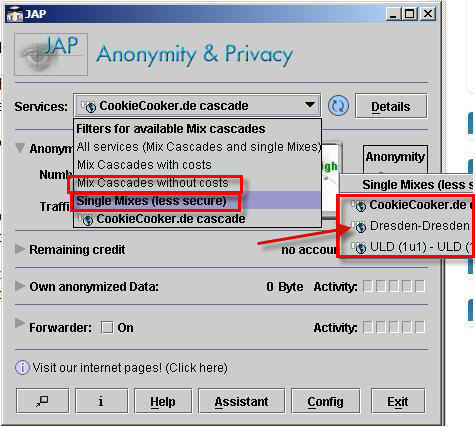
5. On the JAP Interface Click on the Services Drop Box.(As shown in the image below).
Note: This software allows to you to use Mix Cascades both ways by paying money and for free also so Don’t select cascades with cost as they will ask for money.
http://www.technixupdate.com/wp-content/uploads/2007/09/jap.JPG
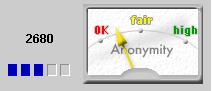
So Select any of the network in the Mix cascades without costs or Single Mixes and check the connectivity status(As shown Below the anonymity meter should be above ok or above it and if it is not try other network from the list).
http://www.technixupdate.com/wp-content/uploads/2007/09/anonmeter.JPG
Re: facebook blocked at my work =(
^^ typical desi mentality... block it for others and use it for self.
I can show many other ways than you can imagine, I have been into that business for long enough, but I would never encourage any one doing that at work place. There are ethical values associated with your work. Your employer pays you for the office time, and some of you spend it on personal stuff.
Re: facebook blocked at my work =(
check this and see what facebook and others are doing with corporate security
the main news is from :
[size=2]http://online.wsj.com/article/SB10001424052748704398804575071103834150536.html?mod=WSJ_hpp_MIDDLETopStories[/size]](http://online.wsj.com/article/SB10001424052748704398804575071103834150536.html?mod=WSJ_hpp_MIDDLETopStories)
Re: facebook blocked at my work =(
work pe work :@:
Re: facebook blocked at my work =(
We too have it blocked…and it doesn’t bother me…
GS Zindabaad…if they blocked GS, then it was another matter