Hi. I’m hoping I can get some additional help here, as I’m at my wits end.
I have a WD Elements 2.5TB external drive. It’s barely 2 months old. Using it for maybe 1 month and a couple of weeks. Been working fine. Except this evening. All of a sudden, it’s not in My Computer. I went on Device Manager, clicked on Disk Drives, where it shows me WDC WD3200etc etc. Location 0 (Channel 0, Targe 0, Lun 0). I then went on Disk Management, where it showed me only my C drive, the D, E and F (the last two being CD/DVD drives). My external drive meanwhile, the light is flashing, indicating that the drive is plugged into my computer, and it’s powered on.
I also went on BIOS and there is no sign of the drive there either. It’s not a USB port/wire issue, as other devices are working in the USB port, I’ve changed the wire, tested the old one with another device but the external drive still refuses to be read. I even downloaded Data Lifeguard Diagnostic for Windows from WD’s website, but all it shows is my laptop’s drive. I tried to install the format file from the website, as a lot of googling said I should do, but it doesn’t install on my laptop, and I take it’s because it thinks there is no WD product on my computer in the first place.
Something else I forgot to mention, I clicked on uninstall on the Disk Drives from Device Manager, did it twice, restarted computer, but nothing happened. I even restarted with the USB cable out, in the laptop, all sorts of configuration, but nothing.
The only thing I see is to exchange the drive for a new one, as it’s still under warranty. That is my LAST resort (and it’s not without it’s hassle believe me). So any way to get my laptop to read the drive again OR recover my data from the drive? Any help would be appreciated.
Did you try the freezer trick ? put it in freezer for some time and then take it out. . google for details , people swear it works , but it never worked for me.
In the meantime I will come back with the name of free software to recover your data from a failed/corrupt drive.
no it probably wont! Try that freezer thing. I heard it worked for a guy in my office.
just try to restore data from a freeware. And then try to get a new one and claim it before its too late. Is it a USB drive which takes power from computer or has an external power?
There are a few things could have happened.
Ext HD might have just pulled out or disconnected last time without clicking on “SAFELY REMOVE HARDWARE” in bottom task bar icon.
Laptop some times doesn’t provide enough power to external drive, just connect to a desktop and retrive data. I have same problem, laptop doesn’t read 60gb ext HD but desktop reads without problem.
Another thing could be large data on Ext H Drive which your laptop is unable to handle.
If worse come worse, if you have very important data on ext HD, it can be retrived and copied by professional very easily.
Good Luck
It should not void your warranty.
If it works you can copy your data to some other place and get a new drive . If it does not then try retrieving your data using this free too.
I personally did not try . But I have used some other tool which is not available anymore.
I have such a tiny freezer in the first place. Sigh will have to empty it first :hinna:
It’s got it’s own external power source.
It hasn’t been unplugged from the laptop since it was plugged in. It’s got it’s own external source of power. Why did the laptop just stop not being able to handle the drive now =(
I’ll try that. Ugh never ever buying WD external drives again. I can’t believe they can be so flimsy!
This is what I mean . I certainly hope I haven’t been trying to uninstall my laptop’s hard drive.
The flashing of the light happened under normal circumstances too. Others reported the same. Apparently it’s a WD external drive thing.
Ok so I installed this file, and it just shows me teh laptop’s hard drive which for some reason is named WDC. Go figure. (Which also means I had been trying to uninstall my own hard drive? ) This is just so weird and not fun.
I will try to plug it into someone else’s laptop and test it out and see what happens.
One more chance you can take is, change USB connection cable and try.
Another try could be disconnect any thing connected to any USB port, SHUT DOWN laptop using normal procedure.
Turn laptop power ON.
(Update windows OS, if you are using genuine program, if it is not genuine then don’t try to update windows, laptop will no longer work)
Connect Hard DRIVE to laptop.
FYI: Freeze, and run is a one-time shot. Twice, and max 3 times if you’re lucky.
Try all other avenues first. Plus Freezing the drive only works, if your HDD is overheating. Freezing, fuses any loose connections back together. If it’s mechanically shot, or the interface is no longer powering it, freezing won’t do much.
I would also try 1. different PC, 2. A different USB cable, 3. If you’re mechanically inclined, get yourself an Interface Data Cable. You will need to remove the hard drive from its current enclosure which could be tricky but instructions are available. The cable, regardless of the fact if it works or not, will be an investment. You can always use it in the future.
Lastly, If it has replaceable data, just get a new hard drive and hope the new one doesn’t give out on you. Always have a 3rd back up of your most vital documents online. try ADrive.com
PS: Seagate Recovery Software is available to be used in Demo mode for free. Try that too. Often the software will see a drive that PC otherwise does not want to. It may also allow you to scan (it will take a long time), and discover and back up any found data. I’ve had much success with this on more than one occasion.
Agreed, don’t try freezer method until its your last resort. It didn’t work for me and as far as I’ve read once you freeze it and if it doesn’t work the drive is gone because when it unfreezes the drive will get wet (right?)
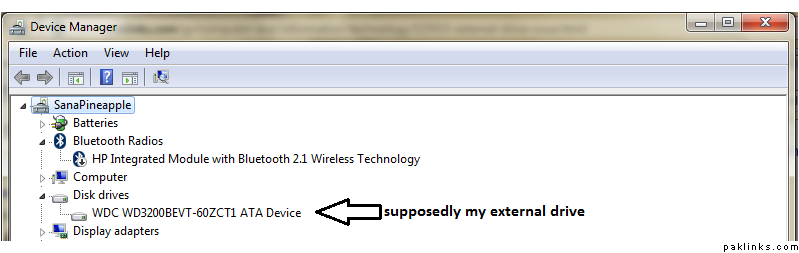
 ) This is just so weird and not fun.