*edited - found the answer to my problem:
‘A well known limitation to Excel is that you cannot “nest” more than 7 functions’
so how do I get round it? any quick solution?
*edited - found the answer to my problem:
‘A well known limitation to Excel is that you cannot “nest” more than 7 functions’
so how do I get round it? any quick solution?
Re: Excel Gurus Help: Nested IF
....and that answer is....?
I was going to suggest use OR, unless you have something better because sometimes this limit bothers me too.
Re: Excel Gurus Help: Nested IF
^ how do I use the OR?
this is the If function I was trying to use before I discovered that you can not nest more than 7 IF functions.
=IF(P3<11,"U",IF(P3<14,"G-",IF(P3<17,"G",IF(P3<21,"G+",IF(P3<24,"F-",IF(P3<27,"F",IF(P3<31,"F+",IF(P3<34,"E",IF(P3<37,"E",IF(P3<41,"E+",IF(P3<44,“D-",IF(P3<47,"D",IF(P3<51,“D+",IF(P3<54,"C",IF(P3<57,"C",IF(P3<61,"C+",IF(P3<64,"B-",IF(P3<67,"B",IF(P3<71,"B+",IF(P3<74,"A-",IF(P3<77,"A",”A+”)))))))))))))))))))))

Re: Excel Gurus Help: Nested IF
for such problems use VLOOKUP or HLOOKUP functions…
or simply write a function in the macros…
see this for vlookup:
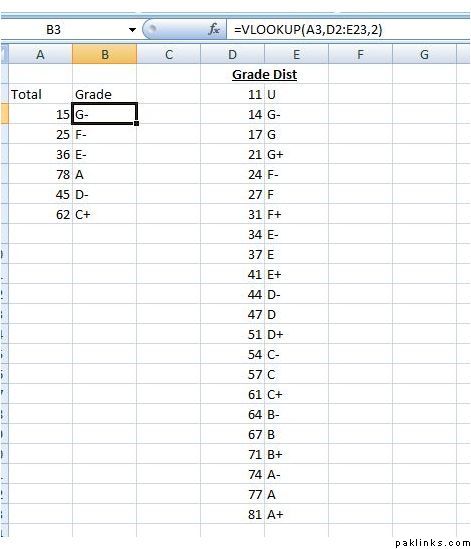
Re: Excel Gurus Help: Nested IF
In this particular example, OR wouldn’t work and I would suggest what armughal has already suggested: Use vlookup. I had one situation at work where I needed to put more than 7 IFs in a statement and my co-worker solved the problem using OR. I like VLOOKUP more.
Re: Excel Gurus Help: Nested IF
I tried V Lookup before I tried the whole IF thing, I used your example Armughal but it still keeps returning #N/A instead of the correct value?
Re: Excel Gurus Help: Nested IF
^ Make sure that you have the lookup array referenced as a constant...
in Armughal's example posted above, the VLookup function would be:
vlookup(A3,$D$2:$E$23,2).
Another way to do this would be to name the lookup array and use that name in the vlookup function.
Hopefully this will solve your problem with getting NA values.
Re: Excel Gurus Help: Nested IF
^ nope :no:
The example armughal has provided works, but doesn’t when I put it onto my own spreadsheet.
Re: Excel Gurus Help: Nested IF
^ what was your question again... you come back after six months to say "Nope" ??!!
I know that my solution works with what armughal is trying to show... not sure about what you're trying to do.
Re: Excel Gurus Help: Nested IF
^ I've not had a chance to look at it until today, the same error message #N/A keeps apperaing even after referencing it as a constant.
I'll have to upload the spreadsheet
Re: Excel Gurus Help: Nested IF
did u try that if,then,else function?..
Re: Excel Gurus Help: Nested IF
^ Is that where u use VB code?
Re: Excel Gurus Help: Nested IF
Here is the sample spreadsheet file where I am trying to use VLookup.
Re: Excel Gurus Help: Nested IF
^ fixed...
you've stored the numbers in your "Grades" table as text. Highlight the first column in the grades table and click the exclamation mark at top and select "convert to number".
Also you need to include the 0 to 10 range in your Grades table - otherwise 0 would map to nothing.
Re: Excel Gurus Help: Nested IF
^ fixed... you've stored the numbers in your "Grades" table as text. Highlight the first column in the grades table and click the exclamation mark at top and select "convert to number".
Thanks yaar! btw why do we need to set it to convert to number when it's already formatted as number?
Re: Excel Gurus Help: Nested IF
well - in the spreadsheet that you uploaded... it was stored as text...
this happens usually when you copy paste the table from a word processor. Also, there's a subtle difference between "format" as number and "store/treat" as number.
Re: Excel Gurus Help: Nested IF
Are you sure? When I checked it was number. Anyway,  khair brother, you’ve made my life much easier.
Re: Excel Gurus Help: Nested IF
Use it like that
=VLOOKUP(TRIM(B3),Grades,2,FALSE)
TRIM will convert it in to text.
Always put FALSE as argument in VLOOKUP to get the unique values.
For too complicated IFs, use VBA. Its more manageable and efficient.
Good luck.