Downloading bit torrents? Slow connection?

A friend recently asked me (as if he had exhausted all his efforts to find out otherwise) that his internet at times acts very slow and especially at certain times in the evening and on weekends… my first question for him was does he have any computer in the network downloading bit torrents. He did, not just one but two! So, after two three days of testing the problem in fact was the bit torrent download technology. :bummer:

I went through 3 Linksys routers and now Cisco 831 but problem with bittorents and extremely slow internet does not go away. Of course with linksys, you cannot see what is going on on the router which would slow down your connection as soon as you open your bit torrent client. One thing which is different between cisco 831 and linksys is that with linksys the internet connection was DEAD and the router had to be reset in order for it to come online again but cisco831, the connection does slow down intially but gains speed after few minutes into the downloads… perhaps, as soon as it validates the connections with other peer it goes back to normal operation.

See the screens shot of router output during bit torrent downloads and after

Just few seconds after I opened my bit torrent client… these half open sessions showed up on the router:
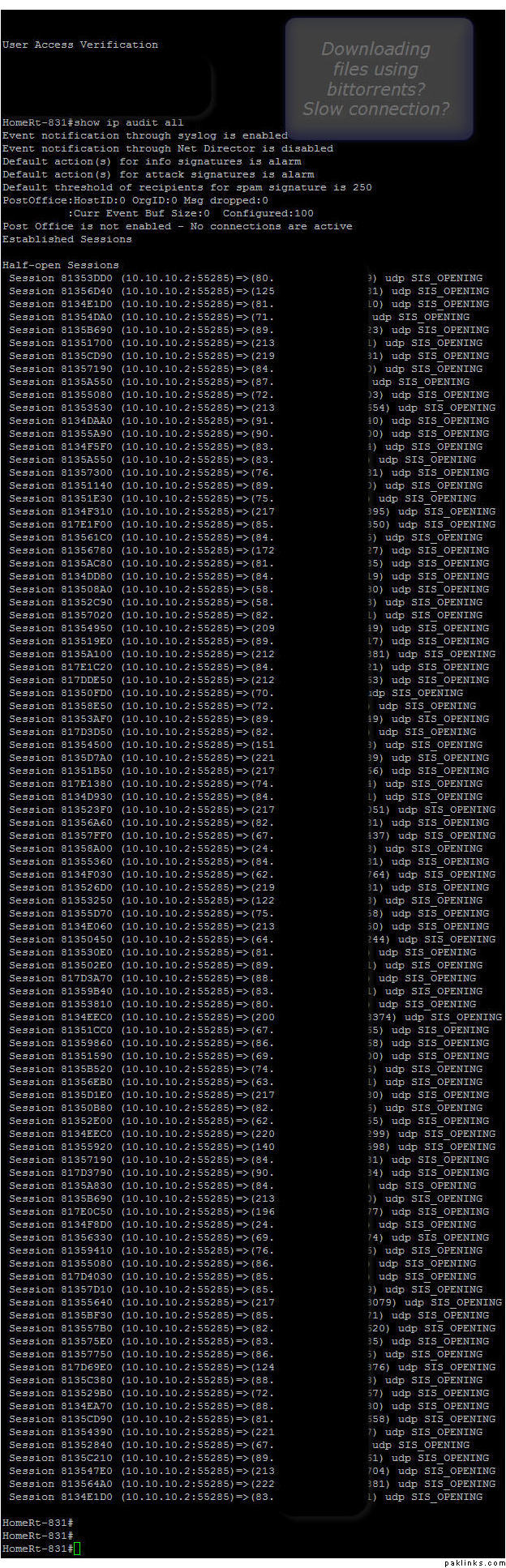
As soon as I closed it, this:

So, if you experience slow connection/internet every now and then + you are download bit torrents… this could be your problem.

I was not able to reproduce this problem on non linksys/cisco routers. I did not have this problem with D-links three years back… who knows?

Re: Downloading bit torrents? Slow connection?

With Linksys routers, the problem of slow internet and router dying out on you can be either the firmware version of the particular linksys model or it could be the bit torrent client. For reasons not quite known to me or investigated by me, I have found that with utorrent client i had this problem often where my internet connetion would crawl to a halt while with Azureus client I never had such issue.

For linksys there are some hacked/modified versions of the firmware available readily off the the sites which claim to corrent the bittorrent+slow internet problem.

Re: Downloading bit torrents? Slow connection?

The output above is from Azureus... which I took today. I've tested with open sourced firmwares such as dd-wrt, etc. without any progress. Once I changed the router from linksys to cisco IOS, it initially slows the connection but after few minutes goes back to normal.

I've had cisco for past 6+ months, so all tests on linksys were early last year... maybe firmwares have changed by now.

Re: Downloading bit torrents? Slow connection?

I've had the same issue with Azureus as well. I believe there's an option in both where you can limit the number of incoming connections so it doesn't kill ur box.

Re: Downloading bit torrents? Slow connection?

Apparently, with the new latest version of Azureus, this issue seems to have fixed it self... little or no change in connection speed or browsing.

Re: Downloading bit torrents? Slow connection?

Except Bit torrent and lime wire Which program do u prefer for downloading movies..
Bit Torrent makes internet connection slow…:bummer:

Re: Downloading bit torrents? Slow connection?

Chanel, try *vongo.com *;)

Re: Downloading bit torrents? Slow connection?

^^^ one need’s to be in united states to view the site :hoonh:
Not For Outside U.S…:naraz:

Re: Downloading bit torrents? Slow connection?

LOL! dunya ro deti hay yar..

khair, regardless what torrent clients and router manufacturer you're gonna use, demarcation router will ALWAYS become slower, and slower, coming to a halt..

the way torrents work is (and i agree on limiting # of connections) the DHT network, along with the tracker, the clients, the connections, everything is remembered.. linksys (non dd-wrt) particularly doesnt like torrents, freezes up EVENTUALLY after how light/heavy torrent you use..

dlink 3 years ago, yes gives me better 'non-headache' for torrents.. cuz it was a crappy-ier 'router' ..

^^ sort of contradictory statement to itself.. but i dunno how else to explain it..

regardless of brands and clients and things in the middle of those two points, i've come up to the following:

. dedicated mapped port on the router

. torrent machine on static address, if dhcp, assigned the same address (dont ask why)

. torrent machine NOT on DMZ settings, properly firewalled, rules properly assigned for the incoming connections, yet discarding hacking attempts, yet allowing connections made by torrent application/that specific port (combination of security and performance)

. connections limited to 40 per torrent, maximum global connection limit of 150, with 4 upload slots per torrent, using additional slots if upping speed dropping below 95% capacity.

. uploading limit of 30k (maximum, on global)

. maximum of torrents: 5, maximum uploads: 2

. use application scheduling whenever possible, focusing towards night times in local zones whenever possible.

. if application allows 'encrypted traffic' , use it. (nothing to do with security).

. hold/pause/stop all torrents, shut application down, reset router every 24 hrs, open application, resume all torrents with 1 minute interval in between the resuming of each...

........ these are just some things i found in extended and extensive usage of running torrents ever since the concept actually came out.. problem actually lies in the WAY torrents concept and sharing works.. throwing bandwidth was only the solution with napster..

i still put my dlink old router time to time in use, but its not the right way to go .. 24 hrs rebooting keeps it a nice speed/steady combination

Re: Downloading bit torrents? Slow connection?

Come on now. I've been using Linksys since I first saw that router and never had problems with it. I torrent gigs upon gigs every week, and no slowdowns cuz of my hardware (one of my hard drives did die tho, as well as a router or 2).

Re: Downloading bit torrents? Slow connection?

On a related question... does anyone have a way to anonymize torrent downloading?

Re: Downloading bit torrents? Slow connection?

only porn torrents are dangerous (in terms of privacy data), so i would say, stop porn, dont have to worry about privacy :-)

tofi, yar apni apni qismat hay.. router that i WANA use from linksys, isnt the best one.. and dlink wise i cant have everything in one box..

by this year's end, i will be chucking out 90% of my network stuff out anyway.. not sure about it yet.. but i think i'm getting awfully bored with computers/I.T/networking.. slowly the business/administration is now creeping up in the head..

(maybe its a sign, should become a manager:D)