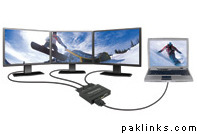
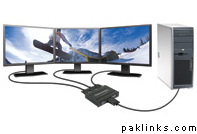
Is it possible to connect 3,4 screen (lcd or monitor) with one pc. As I have seen some VGA cards having 2 outputs, also in windows xp display setting, there are options for two displays.
But I am confused ,how to accomplish 3-4 screens task with one pc. Can we connect two VGA cards in one pc, is there any mother board that support 2 vga.
There are Cards available upto six displays bit I can recommend a VGA Multiplier. Check for it u may find it much cheaper to have a multiplier than having a four or six output graphic card.
I’m using the Quadro NVS card on my workstation. The 440 is capable of upto 4 monitors. It just has 2 interfaces but then u connect an adapter which splits and lets you connect 2 monitors to each interface.
Multiple graphic cards is an option too and has been around since the Win 98 days.
This can be an example of Multi output graphics card. Usually corporate banks give that to their employees due to a lot of JD-Edwards etc windows they have to open.
There are Cards available upto six displays bit I can recommend a VGA Multiplier. Check for it u may find it much cheaper to have a multiplier than having a four or six output graphic card.
does a multiplier able to display different outputs on all the screens. I mean, can we open different windows on different screens, at 1 screen, we look at stock market web, at second we look at a microsoft word document, at third we r watching a movie & fourth we are checking our emails.:D
still the same question…able to display different windows in different screens…conside, the pc is reserved for stock market use…looking at multiple company 's values in the same time on 4 different screens.
As Tofi Baba suggested, we are also using NVidia Quadro FX 3000 cards having quad outputs with NTI Veemux to display multiple screens on multiple displays (LCDs, projectors, Plasmas).
Also, I have seen quadro pics.........It has 2 output in its backside.....how we can increase it up to 4 outputs. is there any adapter available for it...& support software...
The splitters amplify one signal to two... SO u ll be with one screen on two displays... What your looking for is extended desktop... You ll need to change ur desktop mother board to a PCI-e mother board which has two PCI-e x 16 Slots... U can opt for Nvidia SLI or ATI Hyper Link... Install two graphic cards with dual outputs that makes it 2X2=4 display outputs... My Company uses this settings... Not for One monitor movie and the other for various other tasks but just simple they have attached 4 plasma screens to form one huge plasma screen and the desktop blends in all the four plasma to form one huge screen... :)
very nice & to the point Answer, well my boss has assigned me this work , but in Saudi Arabia it is not eazy to find latest hardware, but there are some places where we can...