anybody have worked with it.
I am trying to setup bridge connection for wireless using btswitcher on targa wr500 or so said speedport 500 with a cable modem.
I have tried what I can…
anybody have worked with it.
I am trying to setup bridge connection for wireless using btswitcher on targa wr500 or so said speedport 500 with a cable modem.
I have tried what I can…
Re: Btswitcher
And now in English please :p
Re: Btswitcher
lolllllll
I thought someone had some experience using this firmware on that router.
btswitcher is a customized firmware that can be used on different routers.
I have a wireless DSL modem/router named "Targa wr500" It is also branded as Speedport wr500 (By T-Com)
Now I have removed their branded firmware and uploaded the customized firmware "btswitcher"
I want to use the wireless capability of the router bridged to a cable modem (Virgin media Ambit)
I have tried the possibility that were available through out google. But somehow I am able to set it up as bridge with a dsl router and not with a cable modem router. Even if I select bridge mode and disable dhcp in the wireless router. Now I have a question. I am trying to use it as AP and where as it is recommended to use ti as client to make it happen. But when I change the wireless mode to client, wireless switches off and so the wireless status in router doesnt broadcast any ESSID. And also if I scan it on the wireless enabled laptop it doesnt show the SSID, not even if I manually enter the SSID and other setting in laptop to connect it. While by AP it shows it but with AP it is bridging it only for DSL router and not for cable modem.
Now can any one tell me how to make it work for Cable modem?
I think so this English is fair enough to understand :D
Re: Btswitcher
i have tried a different solution in past.. i tried EXACT same scenario with a dd-wrt "MICRO" firmware.. setup that i was trying to achieve was:
xbox 360 > wired connection into > "ddwrt-micro box" (setup "wireless radio" into a "CLIENT BRIDGE" mode) (ad-hoc/AP mode) > main router box > cable modem > internet.
the "wireless port" MAC address AND xbox 360's MAC Address was needed for main router box due to mac filtering installed.
[added] and after reading ur reply about wireless box, let me clarify something .. ur wireless radio's mode of being a CLIENT will take away the ability to "broadcast" SSID ..
SSID broadcasting in this case would mean its not an AP , its an INFRASTRUCTURE, meaning regular operation ..
can you confirm that you are trying ur custom firmware wireless box to connect to ur cable modem (a NON router cable modem?)
Re: Btswitcher
"ddwrt-micro box" (setup "wireless radio" into a "CLIENT BRIDGE" mode) (ad-hoc/AP mode) > main router box > cable modem >
First I want to know...
You mean I need ddwrt microbox and then router box and then cable modem? Like 3 devices?
as you said dd-wrt MICRO is a firmware..!!
if you mean I need three devices then I just want to ask if it is not possible with the wireless enabled router with a custom firmware to cable modem?
For your last statement / question. Yes I am trying to do that.
Re: Btswitcher
DD-WRT works with everything. I can't not have it on my fav Linksys model. :D
Re: Btswitcher
Right now loading it on... will play with it for sometime..
=========
crap: still looking for the right ROM as the one I got wasnt suitable.
I think this customized rom isnt meant for the router I named i.e. Targa wr500 / Speedport wr500
I think so you havent got the firmware I was talking
check for "bitswitcher" on google and tell me if you can see something about it.
Last update: ddwrt-micro isnt even getting uploaded. with tftp (linksys and asus) they are not able to get it.
With tftpd32 I dont have the dhcp server information of this router.
PS: This router is indeed using Broadcom chip with NVRAM :32767k and Memory: 13948k
give it time ..  i had to work around some parameters for the v8 of my stable router to get dd-wrt loaded.. drawback was i had to j-tag some stuff (at that time, killing linksys wasnt possible with a soft-solution). so i tested with a refurb (half price) model first in case i bricked it.
only drawback is i could only load MICRO version of ddwrt.. ([email protected] are getting anal about these things)..
hmm, i can tell u that with a cable modem OR dsl modem in place, a NONrouting, NON wireless model, u need a physically-connected box (computer’s ethernet port, a wired/wireless/combo AP, full router with wireless ability, etc).
your “outside link” device (cable/dsl modem) needs to be wireless/or a wireless router (with cable/dsl modem built into it to talk to outside world) if u are trying for two devices..
i had 3 devices in place, because location of my cable wasnt movable, (factor 1) location of my already-in-place-wireless router connected to my cable modem wasnt movable (factor 2), xbox 360 with tv couldnt be moved from living room (factor 3) and if equipped with microsoft’s usb dongle for wireless it would have cost about $120 CDN at that time.
cheapest device to run dd-wrt (that would allow wireless radio mode to turned into an AP/bridge/client-bridge/repeator-bridge/modes) was a linksys router at that time available for $29 with tax (refurb).
my scenario was to be able to connect xbox with my exsiting setup (wireless router connected to NON router, NON wireless cable modem). after that i could play xbox live, or run media off my computer on my tv. . .
tell me whats ur objective ? cable modem being one device, u want 1 more device to connect EVERYTHING to internet ?
Re: Btswitcher
and a little off-topic, ddwrt allows for following modes for your wireless radio:
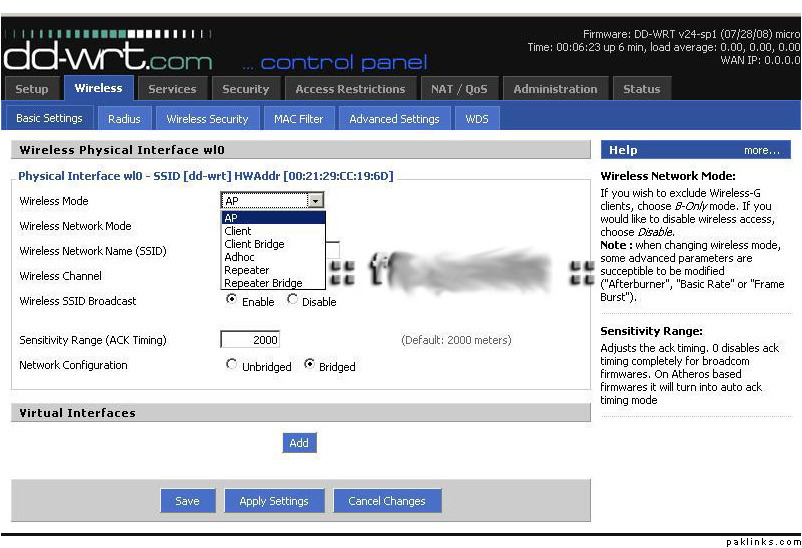
Re: Btswitcher
I read your reply and for the question you asked in the last. yes I want one more device to connect to internet wireless.
If I would have this ddwrt uploaded on the router I could have selected client bridge.
I am still on bitswitcher, Though I am going to do it like this
Wireless AP in Bridge mode.
WAN as LAN/Bridge.
LAN option: Get DHCP settings automatically, while copying the mac address of the cable modem..
Now there is another problem coming..
that right then when I perform the final changes to enable DHCP setting Automatically.. the SSID broadcasting goes off EVEN in AP mode, whereas the Wireless light is on at the router. Now I dont understand this..
Re: Btswitcher
bridge/client/repeator are basically WIRELESS methods of connecting your wired connection to another device, themselves being transparent (no ip address, no way of connecting to them so u have one-shot to set them up).
in which case these modes cant “broadcast” ssid’s …
from what i can make sense out of scenario, u need to:
change wireless mode to bridge (u did).
change wan to disable (or lan or bridge, i dunno).
lan option: IF POSSIBLE need to disable dhcp/automatic settings whatever u can . reason being u want this btswitcher-enabled device to be transparent meaning no ip address, no mac address, no broadcasting, basically just a pipe thats letting communication from your wired device to your wireless router device..
(unless your wireless router IS your btswitcher device) i dunno man, i still cant make sense out of: cable modem’s mac address being copied for lan purposes , this shouldnt be done for any purposes..  ..
..