i purchased a D-link router and an wireless cardbus adapter for my laptop. I bought the laptoop 2 years ago and its compaq intell pentium 4. we never reinstall the windows Xp in it but from last couple of days it started to work very slow, i thought may be because of virus wagaira its not working fast so i should reinstall the windows xp..
but before i reintall the windows i install the d-link wireless adopter by installing its driver first and then the software… it worked fine that time but now when i reinstall the windows. its not working anymore..
i called the company(dlink) they said u dont have service pack 2 and u are missing some critical updates which i download it… but it still didnt work. then i call them again they said u are probably missing some bios.. i download that too from www.hp.com(i hope i dl em correctly)
but i still am not able to install dlink carebus adapter. everything i install the software, they ask me to shut down the comp and insert the card and then install the adapter… but whenver i do that though. my computer freezed.
i called the company again but they said there is something wrong with my comp.. i dont knwo why is that… i called compaq and they said ur warranty time is over so we cant help u…
can anyone help me? if someone knows how to get into my system and check to see if something is wrong?
go to device manager and check the driver files for the wireless card..
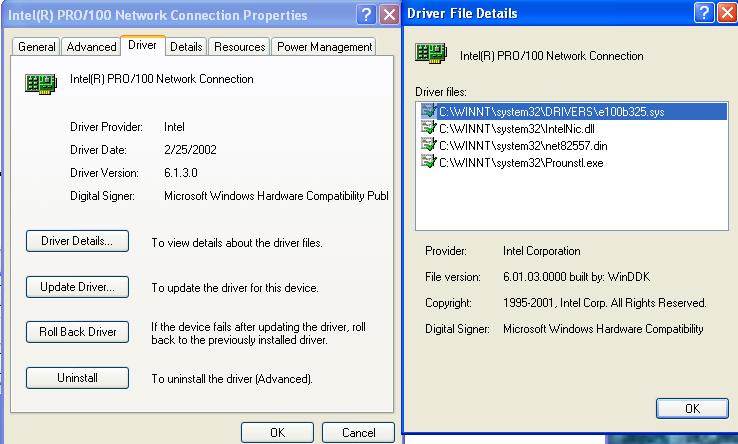
follow this screen shot at http://upload.jibranilyas.com/files/dm.JPG
[IN device manager, right click ur wireless card–>properties–>driver details]
Move those driver files to a “backup” folder ( do the cut/paste )
UNINSTALL the software from Add/remove programs and also uninstall the device from DEVICE manager.
Go to D-link’s site and download the latest drivers for your wireless card
Install the new drivers
Insert your wireless card…
i was having the same kinda problem wid the D-link router.. so i just retured dat some other brand and it started working again fine.. lemme see if i can find a solution for u too...
The realtek might be a built in ethernet adapter.
If a device is not working it won't show up inthe appropriate section, ie if this card is not working it won't be under Network Adapters, it would show up under a big yellow question mark and would say unknown device. Make sure the service Plug- n-play is enabled and started, in Device Manager right-click on Network adapters and "Scan for hardware changes".
When you reinstalled Windows, did you install the drivers for the cardbus PCMCIA slot? Try that and reinstall the Wifi card.
If its still not picking it up, replace the card. If the replacement doesn't work either then there just might be something wrong with your computer's PCMCIA slot
Just curious..when you reinstalled windows Xp was it from your compaq Xp recovery disk( dun remmeber wat its called) or just an XP software?If it was from a recovery disk/s then I'm sure all of your drivers are in place. It could be the issue of the network card.
Also there is a remote assistance feature in Msn. I never used it but I believe one of your computer friends can get into your system and check the settings.