Re: Microphone issues on WinXP SP2
i hav tried but its … the best appropriated drivers r already installed …i mean i did try to update the audio driverss…
Re: Microphone issues on WinXP SP2
i hav tried but its … the best appropriated drivers r already installed …i mean i did try to update the audio driverss…
Re: Microphone issues on WinXP SP2
how can you say that best approprite driver is already installed?
Re: Microphone issues on WinXP SP2
Kam, go into Device Manager and read what it says under Sound, Video, Audio
Re: Microphone issues on WinXP SP2
Bhai Sahab, your microphone pin is in wrong hole
Re: Microphone issues on WinXP SP2
he said, tha MIC is being shown **disabled **in volume control panel .. :s
Re: Microphone issues on WinXP SP2
in some realtek sound cards and maybe also to others its so that if you dont plug the device in “right” plug then it doesn’t get activated. Further more if you are having installed the software of the sound card i.e: Sound cards own volume controller then you should check it too. Sometimes it is disabled through different advanced options.
The first thing is as said by others, update the drivers, not only by pressing Update Drivers and then search for the updates but looking for the drivers on internet. (mainboard website for builtin or sound card’s website if its separately installed.)
Re: Microphone issues on WinXP SP2
Jis bechra ne vcht kerna thee woo tou ub chale gie hai … so its pending … 
Tlk .. ya plug pink mic wale port mai he lagaya hai …
i hav tried everything … as i didnt hav the actual motherboard cd … i think ther is som issue with the drivers …
Re: Microphone issues on WinXP SP2
^^ if you don’t have actual motherboard CD and you are on Windows XP Sp2 then do following:
On the Desktop You will see My Computer.
Right Click ‘My Computer’
Select ‘Properties’
Go to’ Hardware’ Tab
In there Select ‘Device Manager’
Go to Audio & Sounds and Click on ‘+’ It will open a tree
Print Screen that as I want to see which sound card you have, or maybe I want to tell you which steps to do further to get the Hardware ID of the sound card and to look it further on internet for the updates.
Re: Microphone issues on WinXP SP2
let me try it …
Re: Microphone issues on WinXP SP2
hmmm … here it is for uuuuuuu
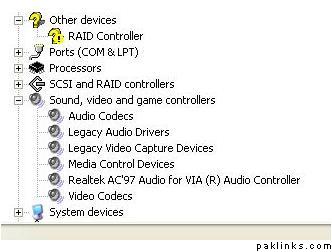
Re: Microphone issues on WinXP SP2
Right click on ‘Lagacy Audio Driver’
Select ‘Properties’
Go to Tab ‘Details’
In the Drop Down Menu Select ‘Hardware ID’ (I hope so that’s in English as I have German)
Print Screen that and paste here.
Do same with 'Realtek AC’97 Audio for VIA (R) Audio Controller, and paste the screen shot here. (I know both can be same, but have my doubts)
Re: Microphone issues on WinXP SP2
ya …
Re: Microphone issues on WinXP SP2
Aaho com in a chat … lets resolved it ther …
Re: Microphone issues on WinXP SP2
Its better we should do it here so that other can also get it for the future reference. 
Re: Microphone issues on WinXP SP2
ya i m waitng …
Re: Microphone issues on WinXP SP2
Please read it again. here means here on forum in this thread!
Re: Microphone issues on WinXP SP2
yaa i m waiting hereeeeeeeeeeeeeeeeeeeeeeeeeeeeeeeeeeeeeeeeeee bhaiii 
Re: Microphone issues on WinXP SP2
abhe tk nhe hua theek kami 
Re: Microphone issues on WinXP SP2
bus honai wala hai …
Re: Microphone issues on WinXP SP2
Waiting for what? Read above where I asked what to do next.