Picasa is not only a good editing software, but it is a good photo management tool as well. I use it for everything. I transfer my photos from the camera directly in to Picasa and make an album. After that I select which ones I want to edit/make use for further use and export those photos. I, at the exporting stage, sometimes reduce the photo size too from a huge 4.3 MB photo size for example to a manageable, 750 KB; if I want to use that photo for online purpose. If I want to print the photo or just store it in the external HDD, then I export the full quality version and edit that. After exporting the photo, I edit the photo in Lightroom. After that Photoshop.
This is an official tip from my side. You guys are welcome to read it and assimilate it in to your grey matter.
please don’t hate me as I am usually very strict about teaching and learning.
If you haven’t read my forum posts I’m usually very much to the point but I hope you won’t take it personally and learn from your mistakes and others.
Please make sure you know what you want your audience to be looking at because want them to know what you saw.
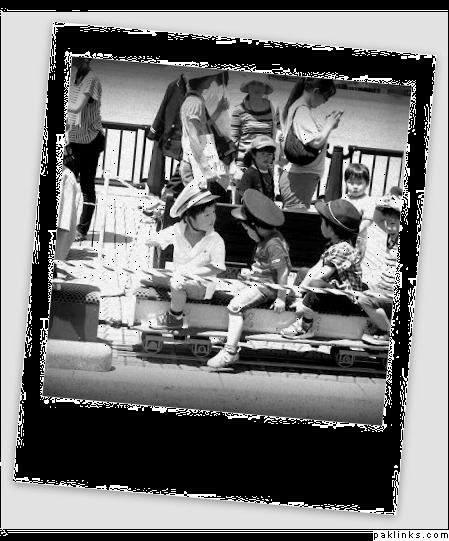
Devi you brought the attention to the boys on the train with leaving them colour but because it was a quick job some of the back ground also have colour and the feet are grey. Later in this class (presumably) you’ll learn about layers and then you can suffer like I had to (jk) making sure what I wanted was in colour and the other was in black and white
you have no idea how many hours I poured into this..
rosedreams:
It seems that you drained the colour out of the picture and then blurred it to put focus on the two boys (who I don’t think are related) I can see how that would be a parents view however because its so blurred it would have been better if you had just cropped it and blurred the sides a bit.
annie bibi:
It seems we’re having a black/white theme today. I’m wondering why the picture is so grainy..? its very bright which is why it’s making every light colour white. I’m assuming you wanted to focus on the front boy but you shouldn’t have cut the 4th boy and perhaps cropped a bit more on the left side and the right side or if you wanted to just focus on the front boy you could have cropped it to the third boy and left the adult guy there and blurred a picture a bit not so much that you can’t tell who the person is but enough to make the first boy stand out.
Hmmna:
The first colour picture yay. Although you cropped it nicely you should have cut out the background people because they are distracting and it removes the focus from the train riders (assuming thats what you wanted to focus on) Its nice that you made the photo bright but in order to do that you made the faces/clothes really dark and it just loses its quality. Next time try to hold back and check the skin/clothes colour before changing it.
STA:
Overall I like this picture you focused on a subject and stuck to it the background kids weren’t necessary but you included them as well which was nice. I see you didn’t change much of the colour except making it brighter. Perhaps next time you could add something in order to enhance it more?
I have no complaints about this except try using different tools next time and experiment.
thanks for the critique kakee. i actually liked the guy on the far left but thought if i just focus on him then the pic will be too empty. but ur pic shows it works better focusing on one thing
yah I was thinking that too and I actually made two with one cutting his face and the other not xD
I should have uploaded both of the styles that I did.
so here you go
hm okay
well read what I said with annie bibis crop. Is the blur intentional? its really bright which means that a lot of arms/hands are going missing O.O
try to make it darker next time?
While editing you should always look at your photo and see if there are drastic changes between the original and the edited one.
You don’t want your nose to go missing if your making it too bright right? and if you make it too dark it just looks unnatural.
When editing photos you want it to make it seem like you took that picture and that its all natural and nothing was changed.
I mean if you look at the models on magazines nothing about them is real. Their legs, arms, nose even chin is borrowed from somebody else or edited out but it looks so natural right?
I wish I could show you my picture of my sister that I did. I bruised my sisters eye on photoshop and it looked so realistic but this was 3/4years ago so its long gone..
I did notice the light, it was too bright. You are absolutely right,main point is to keep it real. Next time, I 'll look at the picture carefully while I make changes. Thank you. :k:
Re: GS Photography learning classes with dubaiwali
hey why don’t you guys take pictures of Eid? You know the preparations, food, parties, guests, clothes, shoes etc.
I’m sure it will be colourful and gorgeous not to mention fascinating for me
Embrace the colour
and take as many pictures as you can of whatever you like and found interesting. it doesn’t have to be staged but it does have to be the best one that you took out of all the pictures.